Widget Appearance
Every appearance control for the Widget, including accent color, font, logo, disclaimer and animations, plus what you cannot change.
On this page
The Appearance tab controls the colors, typography, logo and motion that your customers see in the Widget. Open it from Widget, Appearance. Changes are saved with Save Changes, and live embeds pick them up after you save. Settings belong to the selected embed key (see Widget Keys).
Accent Color#
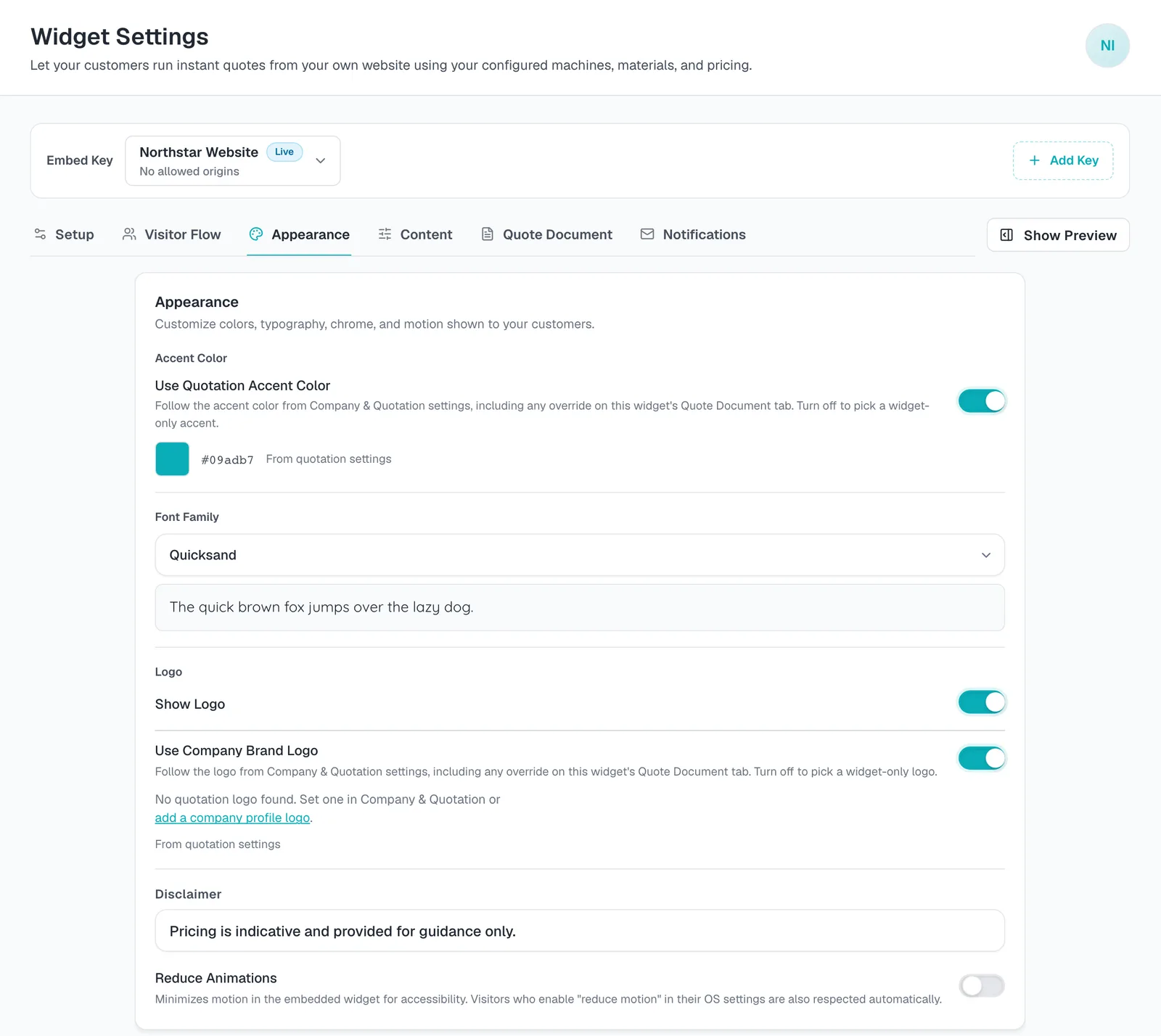
Use Quotation Accent Color#
Default: On. Where: Widget, Appearance, Accent Color.
Follows the accent color from your company quotation settings, including any override on this Widget's Quote Document tab. While on, you see the swatch, its hex value and "From quotation settings". Turn it off to choose a Widget-only accent.
Change it when: keep it on so your website Widget and PDF quotes match. Turn it off if your website palette differs from your quotation branding.
Edit Accent Color#
Unit: hex color (#RGB, #RRGGBB, or with transparency). Starting value: #09adb7. Where: Appearance, Accent Color, shown when Use Quotation Accent Color is off.
Opens a color picker. The accent tints buttons and highlights in the Widget. A website can also override it with an accent-color attribute on the embed tag.
Watch out: check that text on buttons stays readable against your accent.
Font Family#
Where: Widget, Appearance. A dropdown labeled Font Family.
Options: Geist, Inter, Roboto, Open Sans, Lato, Montserrat, Poppins, Nunito, Source Sans 3, Work Sans, Quicksand, System UI, and Custom. A preview line, "The quick brown fox jumps over the lazy dog.", shows the effect.
Fonts load from Google Fonts. System UI uses each visitor's own system font and loads nothing external.
Custom Font Name#
Where: Appearance, Font Family, shown when Custom is chosen. Example: "IBM Plex Sans".
Enter a Google Fonts family name: letters, numbers, spaces and hyphens, up to 64 characters. An invalid name falls back to System UI.
Watch out: a site with a strict content security policy must allow the Google font hosts, or the font will not load. System UI avoids the problem.
Logo#
Show Logo#
Default: On. Where: Widget, Appearance, Logo.
Shows your logo in the Widget.
Use Company Brand Logo#
Default: On. Where: Appearance, Logo, available when Show Logo is on.
Follows the logo from your company quotation settings, including any override on this Widget's Quote Document tab. If none exists you will see "No quotation logo found. Set one in Company & Quotation or add a company profile logo". Turn it off to pick a Widget-only logo.
When off, you can upload an image or use Or Paste External URL (example: https://cdn.example.com/logo.svg). Only web addresses (http or https) or your stored media paths are accepted. Visitors see the logo without logging in.
Disclaimer#
Starting value: "Pricing is indicative and provided for guidance only." Where: Widget, Appearance.
Shown in the Widget footer. Leave it empty to hide it.
Change it when: reword it to match your terms.
Watch out: keep a disclaimer. Widget prices are estimates, and your shop confirms the final quote.
Reduce Animations#
Default: Off. Where: Widget, Appearance.
Minimizes motion in the embedded Widget for accessibility. Visitors who turn on "reduce motion" in their own device settings are respected automatically, whatever this toggle says.
Change it when: your audience may be sensitive to motion, or your site has a calm design.
What Is Not Editable#
These Widget display options cannot be changed on this page:
- Color scheme. You cannot choose Light, Dark or System here.
- Call-to-action button. You cannot set button text or a link here.
- Powered by footer. You cannot turn it on or off here.
Note: A website owner can still pass some options, such as an accent color, as attributes on the embed tag. Only the controls listed above are available in Widget Settings.
Related Pages#
Last updated