
Packaging
Set the boxes you ship in, the foil wrap allowance and the handling fee so Quote prices packing and checks that parts fit.
On this page
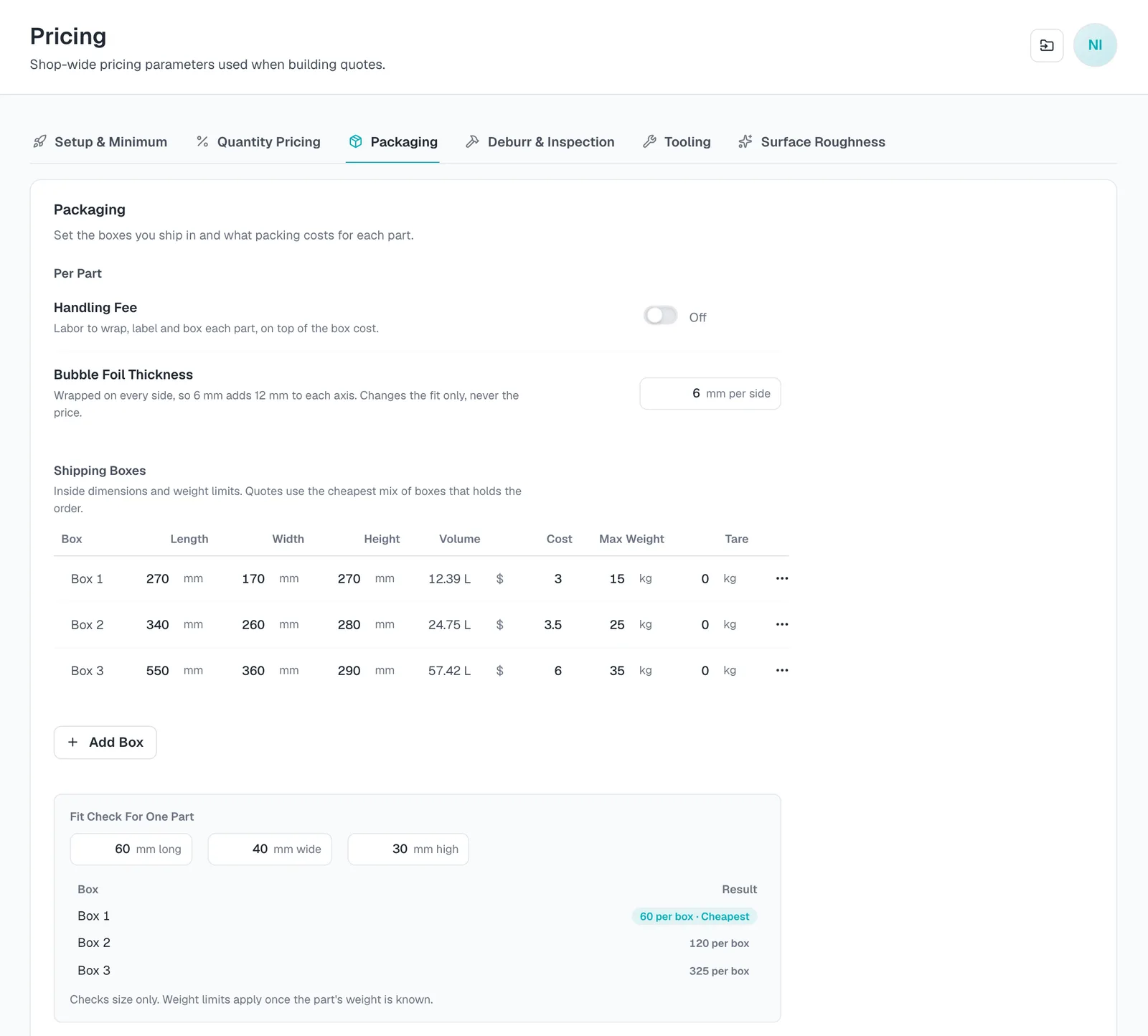
This tab sets the boxes you ship in and what packing costs for each part. Quote uses your boxes to price packaging on every quote, and the same boxes give the carton sizes and weights used for shipping. You touch it when you set up your shop, and when you change the cartons you buy.
Open it from the Pricing page, third tab, Packaging.
Handling Fee#
Unit: per part, 0 or more. Starting value: 0 (off). Where: Pricing, Packaging.
Labour to wrap, label and box each part, on top of the box cost. It is added to each part's cost regardless of quantity, before yield and markup.
Change it when: packing takes real time at your shop. Work out the minutes to wrap, label and box one part, multiply by your labour rate and enter the result.
Bubble Foil Thickness#
Unit: mm per side. Starting value: 6. Where: Pricing, Packaging.
Foil is wrapped on every side, so 6 mm adds 12 mm to each axis. It changes the fit only, never the price.
wrapped part size = part bounding box + 2 x thickness on each axis
Example: a 100 x 50 x 30 mm part with 6 mm foil needs room for 112 x 62 x 42 mm.
Change it when: you pack with thicker or thinner protection. A thicker wrap can push a part into a bigger, dearer box.
Shipping Boxes#
Where: Pricing, Packaging.
Enter inside dimensions and weight limits. Quotes use the cheapest mix of boxes that holds the order.
| Column | Unit | Notes |
|---|---|---|
| Box | Text | Named Box N. Must be unique and not empty |
| Length, Width, Height | mm | Inside dimensions, above 0 |
| Volume | Litres | Read-only |
| Cost | Your company currency | 0 or more. Billed per box used |
| Max Weight | kg | Gross carton weight including tare. 0 means no limit |
| Tare | kg | Empty box weight, 0 or more |
New shops start with three boxes, all with tare 0:
| Box | Inside size (mm) | Cost | Max Weight |
|---|---|---|---|
| box_s | 270 x 170 x 270 | 3 | 15 kg |
| box_m | 340 x 260 x 280 | 3.5 | 25 kg |
| box_l | 550 x 360 x 290 | 6 | 35 kg |
Add Box starts a new row at 100 x 100 x 100 mm, cost 1, max weight 0 and tare 0.
Watch out: enter inside sizes, not outside sizes. Outside sizes make parts look like they do not fit. Max Weight is the gross carton weight including tare, not the net part weight.
How Boxes Are Chosen#
For each box, Quote works out how many wrapped parts it holds. It tries the 6 ways to turn the wrapped part and counts how many fit along each axis, keeping the best. If both the max weight and the part weight are known, the count is also limited by (max weight - tare) / part weight.
Quote then picks the cheapest combination of boxes that holds the whole order. Packaging cost per part = total box cost / quantity, and Quote re-plans this for every quantity tier.
Example: say 20 parts need two small boxes at 3 each. Packaging is 6 / 20 = 0.30 per part.
If no box can hold even one wrapped part, the part is oversized. Packaging cost is 0 and the quote gets a manual review warning.
Change it when: keep the smallest box cheap, and list only the boxes you actually buy. The same boxes are used for shipping weights and cartons, so accurate sizes and tare also protect your shipping price. See Shipping Overview.
Fit Check For One Part#
Where: Pricing, Packaging.
A tool that shows whether and how a part fits your boxes. Use it after adding a box or changing the foil thickness, and again for your largest and heaviest parts, to see whether they fall into an oversized warning before a customer does.
Related Pages#
Last updated