
Shipping Overview
Turn on shipping for your quotes, set your ship-from origin and shop-wide options, and learn how Quote works out a shipping price from your rate cards.
On this page
Shipping in Quote is an add-on to the quote. It is never part of your machining cost. There is no live carrier connection: every shipping price comes from rate cards that you fill in yourself. Open this page when you want customers to see a shipping price, or when a quote shows shipping as "to be confirmed" and you need to know why.
Offer Shipping on Quotes#
Offer Shipping on Quotes#
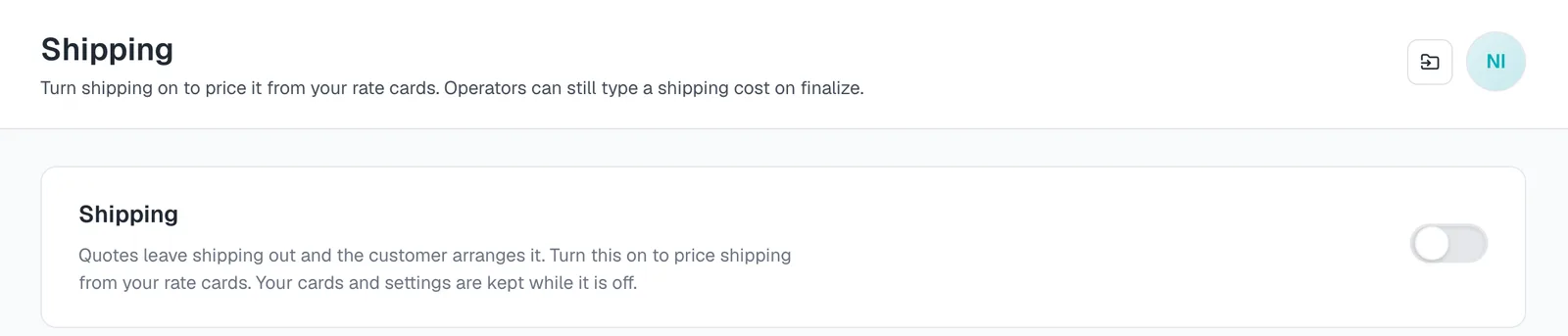
Default: Off. Where: Shipping page, main toggle.
Off means Ex-Works (EXW). Ex-Works means the customer arranges and pays for their own shipping, so your quote leaves shipping out. With the toggle off, the shipping line is 0 and the Incoterm on the quote is EXW. Your rate cards and settings are kept while the toggle is off, so you can switch it back on later without losing work.
On means shipping is priced from your rate cards. The status line reads: "Quotes include a shipping price from your rate cards. Quoted shipping is an estimate until you dispatch, and duties and VAT are not included."
If the only enabled card is the placeholder example card, turning the toggle on shows a "Placeholder Prices Are Still On" confirmation. Read it. The example prices are not a real tariff (see Rate Cards).
Change it when: you want customers to see a delivered price instead of arranging freight themselves.
Watch out: under Ex-Works, if the operator types a freight amount when finalizing a quote, that amount is used and the quote carries the Incoterm setting below (DAP if you left it blank).
Note: Duties and VAT are never included in a shipping price.
Setup Checklist#
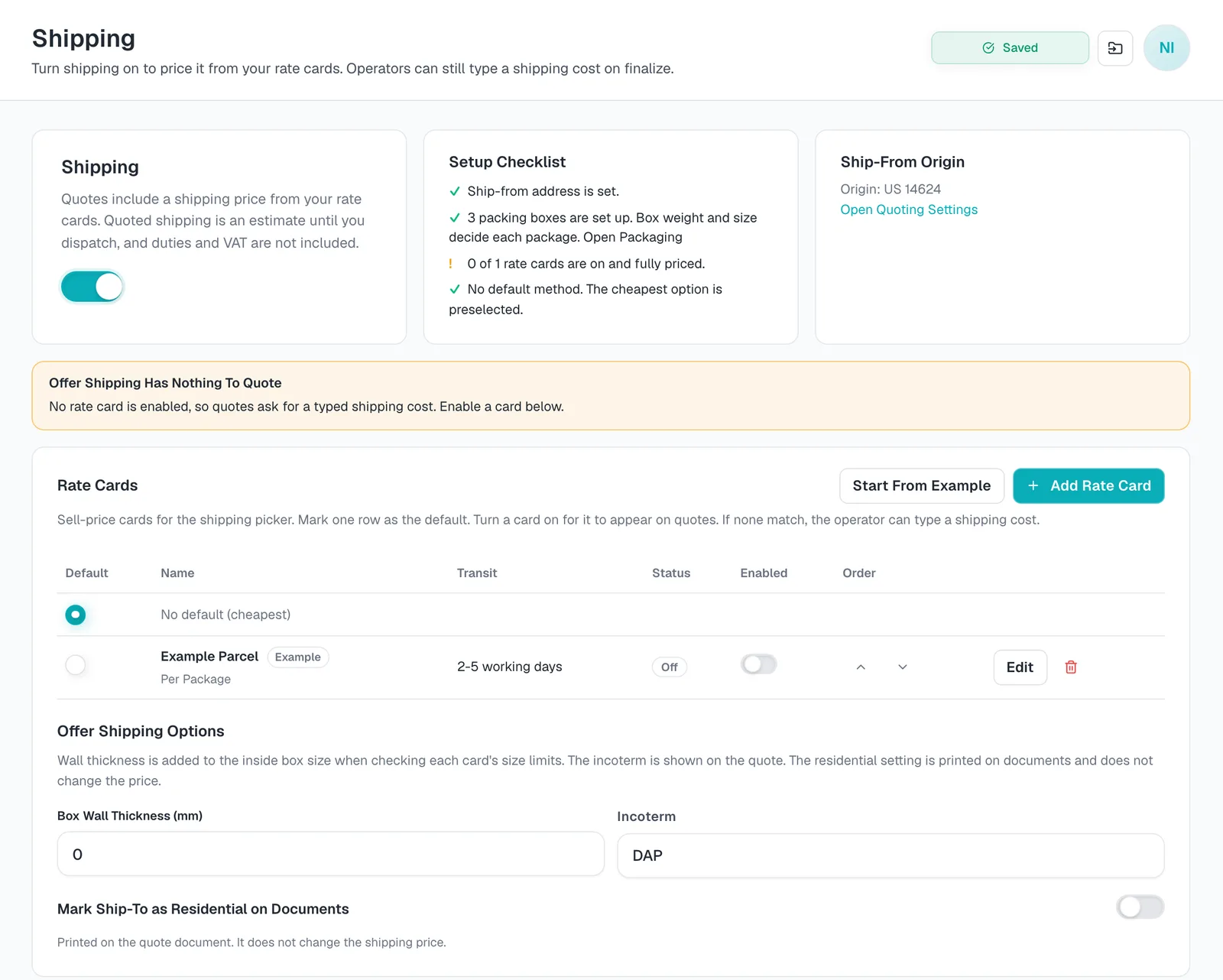
The Shipping page shows a checklist with four items:
- Origin (your ship-from country and postal code).
- Boxes (links to Pricing, Packaging).
- Rate cards ready.
- Default method.
If nothing usable exists, a banner reads "Offer Shipping Has Nothing To Quote". Work down the checklist until every item is done.
Ship-From Origin#
Where: read from Company and Quotation (country and postal code).
Your origin is the country, plus the postal code (the postal code is not needed for Hong Kong), where parts leave your shop. Domestic zones follow this country: a customer in your origin country is Domestic. If the origin is incomplete, shipping shows as unavailable.
Change it when: you move premises or ship from a different warehouse. Update it in Quotation Documents.
Boxes#
Quote builds cartons from the boxes you define in Packaging. Shipping weights come from those boxes, so set them accurately before you rely on any shipping price. A wrong tare (empty box weight) or a missing material density gives a wrong shipping weight, or sends the quote to manual pricing.
Shop-Wide Options#
These three settings apply to every rate card.
| Label | Unit | Default | What it does |
|---|---|---|---|
| Box Wall Thickness | mm, 0 or more | 0 | Outer carton size = inside size + 2 x thickness on each axis. Used only when checking a card's size limits. |
| Incoterm | Text | DAP | Shown on documents when shipping is charged. |
| Mark Ship-To as Residential on Documents | Toggle | Off | Documents only. It does not change the price. |
Box Wall Thickness#
Unit: mm. Default: 0.
Quote adds this thickness twice (once for each wall) to every side of a box when it checks a rate card's Max Height, Max Width and Max Depth. It does not change what the customer pays on its own.
Change it when: your cartons are thick (double-wall board, foam lining) and the courier measures the outside of the box. For example, with 5 mm walls a box that is 300 mm wide inside is 310 mm wide outside.
Watch out: if you leave it at 0 and your cartons are thick, a card can accept an order that the courier later rejects for size.
Incoterm#
Default: DAP.
An Incoterm is a standard trade term that says who handles freight and risk. DAP means you deliver to the customer's address and the customer handles import duties. The text you enter is printed on documents whenever shipping is charged.
Change it when: you sell on other terms, for example DDP (you also pay duties). Remember that Quote never adds duties or VAT to the price, so choose the term you can honor.
Mark Ship-To as Residential on Documents#
Default: Off.
Adds a residential marker to the ship-to address on documents. It never changes the price.
Change it when: your courier needs the marker on paperwork for home deliveries.
Watch out: do not expect it to add a residential surcharge. If you charge one, build it into your rate card prices.
Default Method#
Choose which rate card is pre-selected for customers. The row "No default (cheapest)" means the cheapest qualifying option is pre-selected.
Transfer Menu#
The Transfer menu has Export Settings, Import Settings, Export Rate Cards and Import Rate Cards. Importing rate cards replaces all your cards.
How a Shipping Price Is Computed#
Here is what Quote does, in order, each time it prices shipping for a quote.
- Ex-Works check. If Offer Shipping is off, shipping is 0 (or the amount the operator typed).
- Destination check. The customer must give a country and, except for Hong Kong, a postal code. Until then the status is "pending destination".
- Origin check. If your origin is incomplete, shipping is unavailable.
- Build cartons. Quote packs the parts into your Packaging boxes, one quote line at a time. Different parts never share a box.
- A carton's billed weight is the weight of the parts in it plus the box tare.
- Full cartons are billed at capacity. The remainder goes into the last cartons.
- A part that fits no box ships as one loose piece per unit, using the part size (plus wall thickness) and its weight.
- If any line has no weight, the shipment needs manual pricing.
- Check each enabled rate card. Quote tests the card in this order and drops it at the first failure: card is disabled, oversized items not accepted, over the size limit, over the weight limit, unknown country, no matching zone. A card that passes is priced as free shipping, a band on the order subtotal, the sum of each carton's own band, or a band on the whole shipment weight. Then the card's Minimum Charge is applied, then the result is rounded to 2 decimals.
- Pick the options to show. Up to 8 options are offered. The pre-selected one is your default card if it qualifies, otherwise the cheapest. Options can be tagged Cheapest, Shop default, Faster or Custom.
- If nothing fits. An oversized order, or one over a card limit, goes to manual pricing. A missing weight or no cartons also goes to manual. Anything else shows as unavailable. The manufacturing quote can still be sent, and shipping shows as to be confirmed, unless the operator types an amount.
- Operator override. An amount typed in Offer Shipping keeps the matched options and charges the typed amount. It is never below 0.
- Totals. Grand total = machining total x (1 + quote adjustment %) + shipping, rounded to 2 decimals.
- After sending. Once a quote is sent, the shipping amount is frozen. If the selected rate later disappears and the same carrier is not within 10% of the frozen amount, the customer sees "rates expired".
Worked Example#
A customer in your origin country orders 40 parts. Quote packs them into 2 cartons. The first carton is full at 12.4 kg billed weight. The second holds the remainder at 6.1 kg. On a card set to Each Package, Quote prices the first carton in the 5-15 kg band and the second carton in the 5-15 kg band, adds the two prices, applies any Minimum Charge, and rounds to 2 decimals. On a card set to Whole Shipment, Quote adds the weights (18.5 kg) and looks up one band.
What the Customer Sees#
- A list of up to 8 shipping options with a price and a transit time label for each, with tags such as Cheapest, Shop default and Faster.
- The pre-selected option is your default card if it qualifies, otherwise the cheapest.
- The Widget offers shipping only when your origin is complete and at least one enabled card exists.
- If nothing fits, shipping shows as to be confirmed and your team follows up. The manufacturing quote can still go out.
- Duties and VAT are not included, and the status line says quoted shipping is an estimate until you dispatch.
Common Mistakes#
- Turning on Offer Shipping while only the example card is enabled. The placeholder prices are not a tariff.
- Leaving rate card cells empty and assuming they mean free. An empty cell means the card does not serve that combination.
- Setting a box Max Weight to the net part weight. It is the gross carton weight including tare.
- Expecting Residential or Speed Grade to change the shipping price. They never do.
- Building boxes inaccurately. Shipping weights come from them, so a wrong tare or missing material density gives wrong or manual shipping.
- Forgetting to set your ship-from origin, which makes shipping unavailable for every quote.
Related Pages#
Last updated