
Rate Cards
Build the shipping rate cards that Quote uses to price delivery, with every editor setting, the Preview Rate tool, a worked parcel example and a go-live checklist.
On this page
A rate card is your shipping tariff for one service, for example "Standard Parcel". It holds the sell prices for each destination zone and weight range. Quote has no live carrier link, so it only quotes what you enter here. Open this page when you add a service, change prices, or find that a destination gets no shipping option.
The Rate Cards List#
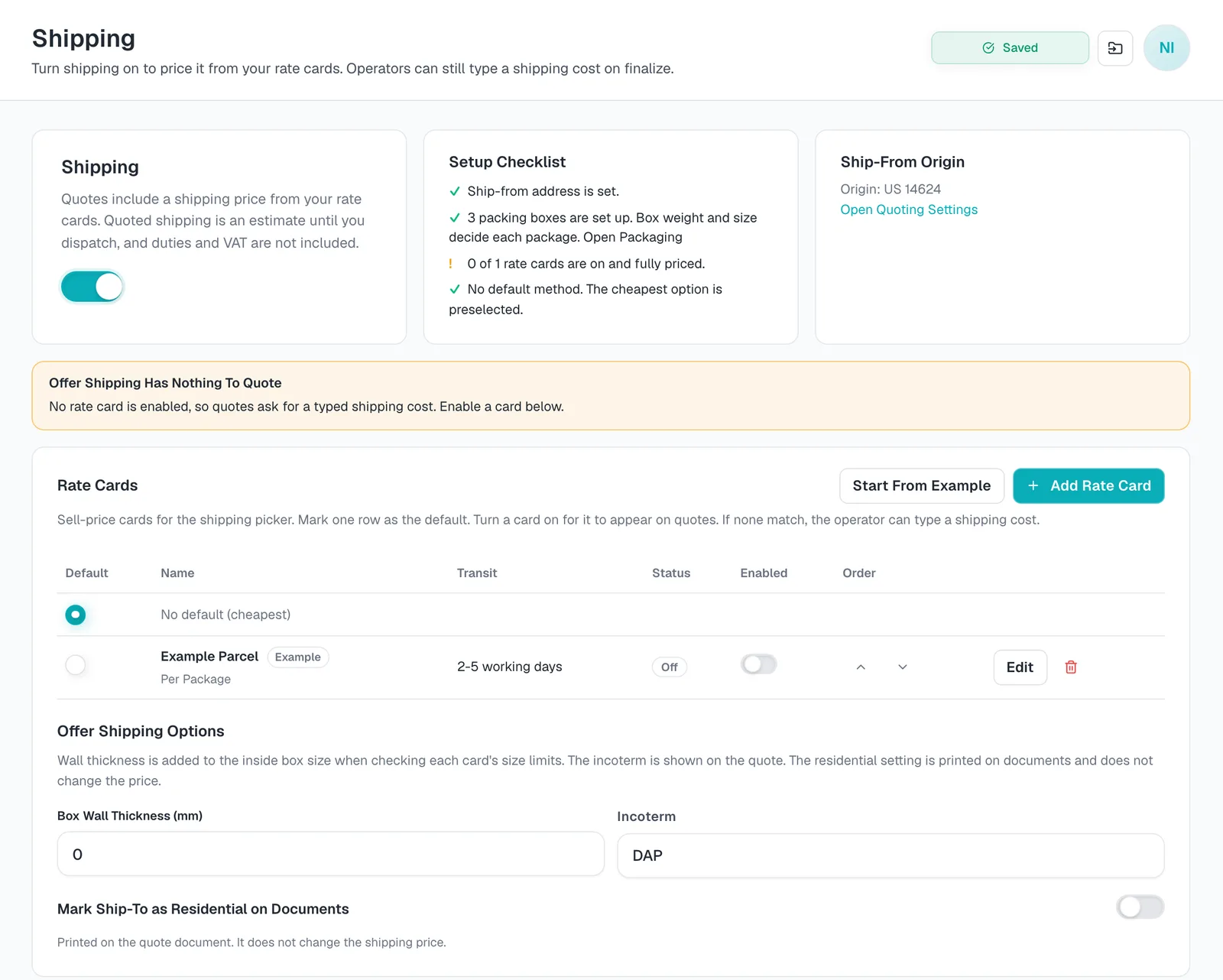
The list on the Shipping page has these columns: Default, Name, Transit, Status, Enabled and Order, plus action buttons.
- The top row, "No default (cheapest)", means the cheapest qualifying option is pre-selected for the customer.
- Status badges: Off, Complete, Placeholder prices, Incomplete, or "N empty prices". Packaging badges: "Per Package" or "Per Shipment".
- Buttons: Add Rate Card, Start From Example, Edit, Delete, Move Up, Move Down.
- You can have at most 20 cards.
- Delete warns: "Quotes already sent keep their frozen amount."
- Importing rate cards from the Transfer menu replaces all cards.
- A company currency change scales every cell price. See Company Currency.
A New Card#
A new card starts with these values:
- Transit label "2-5 working days" and speed grade 5.
- Billing by weight, pricing per package (parcel).
- Off by default.
- Does not accept oversized items.
- Zones Domestic, EU and Rest of World.
- Weight ranges 0-2, 2-5, 5-15, 15-30 and 30-70 kg.
- No prices entered.
The Example Card#
"Example Parcel" is seeded disabled on first start. Its prices are placeholders, not a real tariff.
| Zone | 0-2 kg | 2-5 kg | 5-15 kg | 15-30 kg | 30-70 kg |
|---|---|---|---|---|---|
| Domestic | 8 | 12 | 20 | 32 | 50 |
| EU | 15 | 22 | 35 | 55 | 80 |
| Rest of World | 25 | 40 | 60 | 90 | 140 |
Start From Example copies it so you can replace the numbers. Replace every price before you enable it.
Warning: Turning on Offer Shipping while only the example card is enabled quotes placeholder prices to real customers.
General Settings#
Carrier Name#
Text. The name of the carrier or service customers see, for example "Standard Parcel".
Change it when: you add a second service and need the two to be easy to tell apart.
Transit Time#
A text label such as "2-5 working days". It is for display only and never changes the price.
Speed Grade#
Unit: whole number 0 to 9. Starting value: 5.
0 is slowest and 9 is fastest. Quote uses it to sort faster options when Delivery Days is empty. It affects display and sorting only, never price.
Watch out: do not expect a high speed grade to raise the price. Put the price in the cells.
Delivery Days#
Unit: whole number, optional.
Used to tag the "Faster" option. Display and sorting only.
Enabled#
Default: Off for a new card.
Only enabled cards are offered to customers.
Change it when: every cell you intend to serve is filled and the Preview Rate tool gives sensible results.
Free Shipping#
Default: Off.
The price is 0 for the customer. Minimum Charge and the per-package settings are ignored.
Change it when: you offer free delivery as a service, for example on pickup or on a promotional card.
Billing#
Choose how the card looks up its band.
- Weight: price by carton weight.
- Subtotal: price by the order's manufacturing subtotal, before the quote adjustment.
Change it when: your courier prices by weight (use Weight) or you charge delivery as a step by order value (use Subtotal).
Out of Range#
What the card does when the weight or subtotal is above its largest range.
- Disable This Carrier: the card is skipped.
- Use Highest Range: the card uses the last range.
Watch out: a weight-billed card on Use Highest Range must also have a Max Weight set, or the save is refused. The last range is used only when the value is at or above its minimum.
Locations and Costs#
Zones#
Add a zone with Add Domestic, Add EU, Add Rest of World or Add Custom Zone (searchable country list). Each zone has a Use Zone toggle. You can have at most 12 zones.
| Zone | Covers |
|---|---|
| Domestic | Your origin country |
| EU | The 27 EU countries |
| Rest of World | Any country not matched by an earlier zone |
| Custom | A list of countries you pick |
The first enabled zone that matches the destination country wins, so order matters. Matching uses only the destination country, not the city, region or whether the address is residential.
Watch out: put Rest of World last. If it comes first it catches everything.
Ranges#
Each range row has a Min and a Max. A range includes its Min and excludes its Max. You can have at most 12 ranges. Use Add Range to add a row and Fill Column to copy one value down a column. The editor warns about overlaps and gaps. Changing a band limit keeps the prices you have entered.
For a weight-billed card, ranges are kilograms. For a subtotal-billed card, they are amounts in your company currency.
Watch out: a 5 kg carton falls in the 5-15 band, not the 2-5 band, because Max is excluded.
Cells#
Each cell is the sell price for that zone and range, in your company currency. Enter what you charge the customer, not what the courier charges you.
An empty cell means the card does not serve that combination. It is not free. A zone with empty cells silently drops out for those weights.
Pricing Rules#
Whole Shipment and Each Package#
- Whole Shipment: looks up one band on the total shipment weight.
- Each Package: prices every carton in its own band and adds the prices together.
Choose Each Package for parcel carriers that bill per box. Cards made before 15 October 2026 stay on Whole Shipment. A Whole Shipment card that prices several cartons shows an internal warning to your operator, never to the customer.
Dimensional Divisor#
Unit: cm3 per kg, optional. Typical values: 5000 or 6000.
Dimensional weight charges bulky, light cartons by their size. Billed weight per carton = the larger of the actual weight and (length x width x height in cm3) / divisor. The screen warns when the divisor is unusually low.
Change it when: your courier bills by volume. Use the divisor from your courier's contract.
Weight Step#
Unit: kg, optional. Example: 0.5.
Billed weight rounds up to this step. A 4.8 kg carton with a 0.5 step bills as 5.0 kg.
Minimum Charge#
Unit: your company currency, optional, above 0.
The lowest price the card can quote. It is applied after the band price and is not applied to free shipping.
Change it when: very light parcels cost you more to dispatch than the first band price covers.
Size and Weight#
Max Height, Max Width and Max Depth#
Unit: mm. Empty means no limit.
Quote checks the carton with its largest sides sorted, so rotation is allowed. Wall thickness from the shop-wide Box Wall Thickness setting is included.
Change it when: you copy the courier's published size limits so oversized orders go to manual pricing instead of quoting a price you cannot honor.
Max Weight#
Unit: kg. Empty means no limit.
On a Whole Shipment card it is checked against the shipment. On an Each Package card it is checked per carton.
Watch out: this is the gross carton weight including the box tare, not the net part weight.
Accept Oversized Items#
Default: Off for new and example cards. Older cards are On.
Whether this card may ship parts that fit no box.
Change it when: the card is a freight or pallet service that really takes large parts.
Preview Rate#
The Preview Rate tool lets you test a card before customers see it. Enter the country, weight, subtotal, package size and number of packages. It shows the matched zone and band and the billed weight. When nothing matches it gives a reason.
Change it when: you edit a card. Test the edges, for example exactly 5 kg, a heavy carton and a country in each zone.
Worked Example: One Parcel Card#
You ship from Germany with a courier that bills per box, with a volumetric divisor of 5000.
- Choose Add Rate Card and name it "Standard Parcel". Set Transit Time to "2-5 working days".
- Leave Billing on Weight and choose Each Package.
- Set Dimensional Divisor to 5000 and Weight Step to 0.5. Set Minimum Charge to 8.
- Keep the zones Domestic, EU and Rest of World. Enter prices in every cell, for example Domestic 8, 12, 20, 32, 50 for the 0-2, 2-5, 5-15, 15-30 and 30-70 kg ranges.
- Set Max Weight to the courier's per-carton limit and the courier's Max Height, Width and Depth.
- Set Out of Range to Disable This Carrier so heavier cartons go to manual pricing.
- Use Preview Rate with country Germany, one package 400 x 300 x 200 mm and 3.2 kg actual weight. Volume is 40 x 30 x 20 = 24,000 cm3. Divided by 5000 it is 4.8 kg, which is larger than 3.2 kg, so billed weight is 4.8 kg. The 0.5 kg step rounds it to 5.0 kg. That lands in the 5-15 kg band, so the Domestic price is 20.
- Switch Enabled on.
Go-Live Checklist#
- Every cell you intend to serve has a price. No empty cells, no placeholder badge.
- The card shows Complete in the list.
- Prices are your sell prices, copied from your real tariff.
- Max Weight and Max Height, Width and Depth match the courier's published limits.
- Your boxes in Packaging are accurate, with the right tare.
- Your ship-from origin is complete.
- Preview Rate gives the answer you expect at each band edge and in each zone.
- The example card is disabled or edited.
- You picked a Default method, or left "No default (cheapest)" on purpose.
Related Pages#
Last updated