Trace is now available. Start free trial — Measure and Quote are in early access. Register
Quote Early Access

CNC Quoting Software for Machining Factories

Built for CNC machining shops that quote milling and turning work. Start with the free online STEP, IGES, and BREP viewer, then try the live widget demo on this page. Register for early access to launch Dashboard and Widget on your shop floor and website.

Start with the free STEP / IGES / BREP viewer, or try the full widget demo below. Demo shop uses sample pricing rules.

Quote analysis workbench with hole detection, recommended 3-axis mill route, and interactive 3D preview
Analysis workbench: automatic hole detection, routing recommendation, and 3D preview before you run pricing.

Use it yourself, or let your customers use it

You run a CNC machining factory. Use Quote on your desktop to calculate prices for your customers, or embed it on your website so visitors upload STEP files and get prices directly, without waiting for a manual quote.

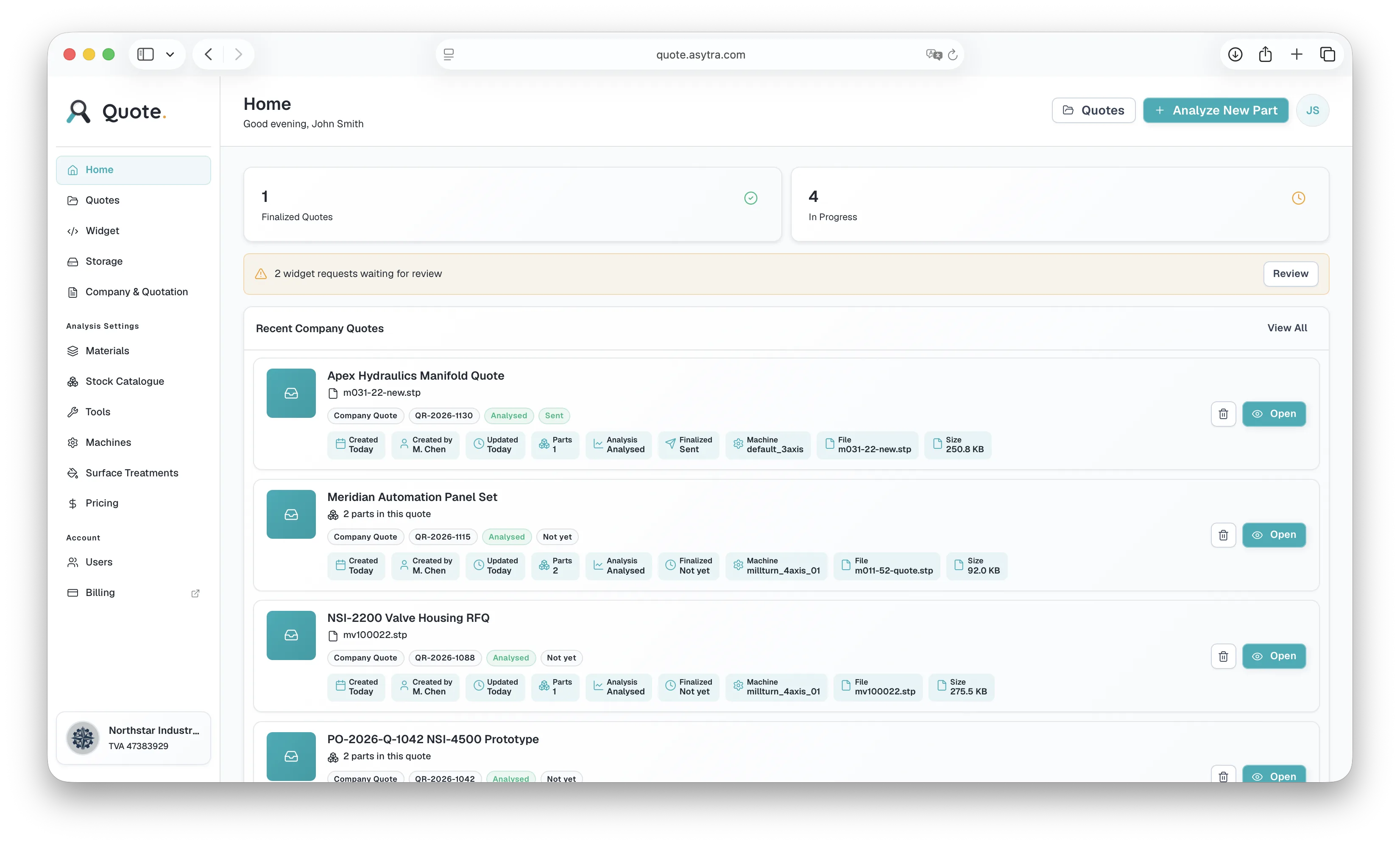
Quote Dashboard home with recent company quotes, widget request alerts, and summary stats

Quote Dashboard

You prepare quotes at your desk

A customer sends you a STEP file by email. You open Quote, upload the file, and have a cost breakdown in seconds. The system flags any design issues and suggests improvements. Configure your own machines, tools, materials, and margins. Bundle multiple parts into one quotation and send back a professional PDF.

  • Upload customer STEP files and get instant cost breakdown
  • DFM analysis flags design problems automatically
  • Configure your own machines, tools, and material stock
  • Automatic routing: milling, turning, combined, 4-axis
  • Bundle parts and export customer-ready quotes
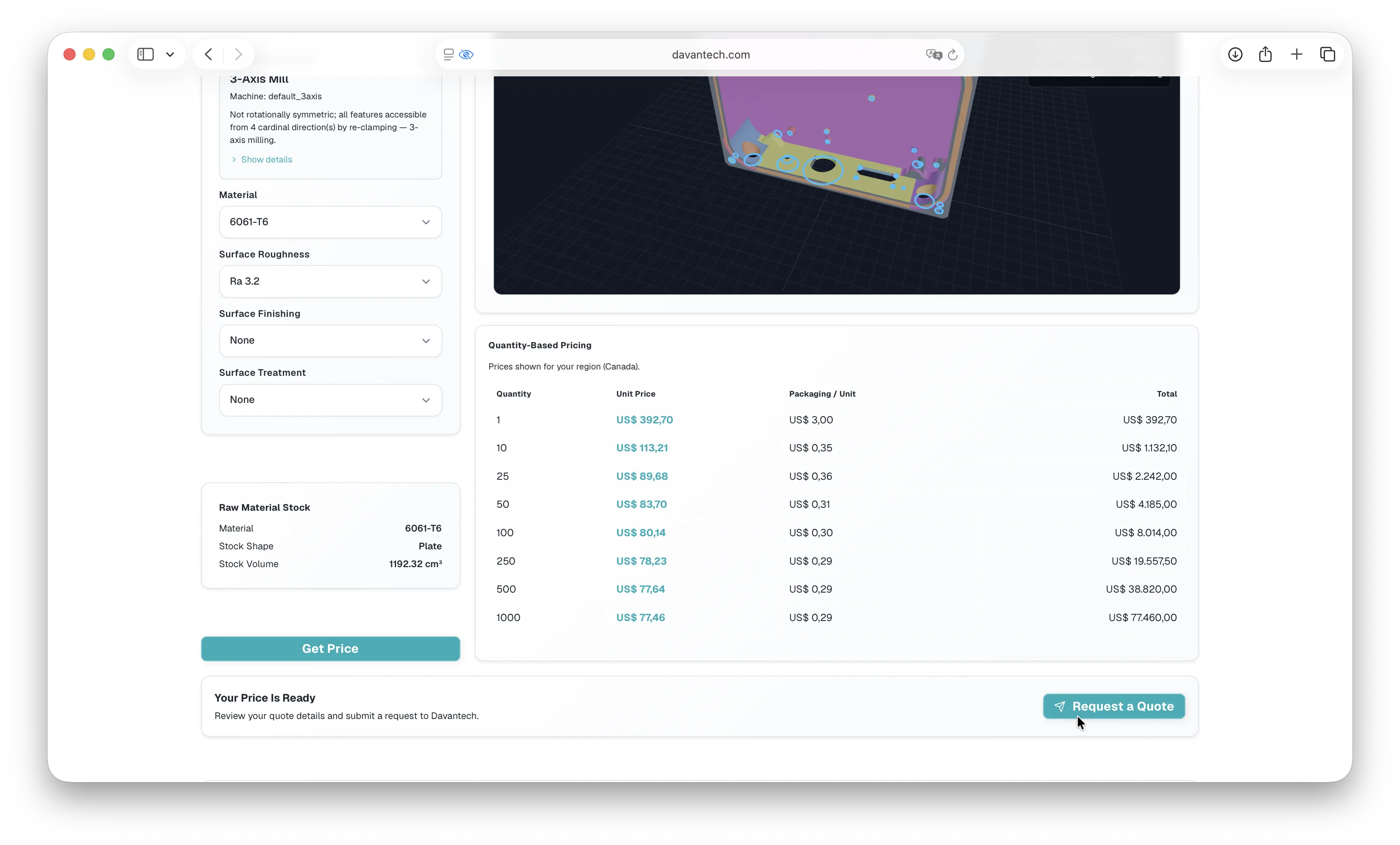
Quote Widget on a shop website with priced part, quantity tiers, and Request Quote action

Quote Widget

Your website visitors get instant prices

A potential customer visits your website at 10 PM. Instead of a "request a quote" form, they see a quoting tool. They upload their STEP file, select material and quantity, and get a price immediately. You wake up to a new lead in your dashboard: the 3D file, the quoted price, and their contact details. No email back-and-forth needed.

  • Visitors upload STEP files and get prices instantly on your site
  • Embed with a single script tag, no coding needed
  • Your branding, your domain, your pricing rules
  • Captures leads: 3D file + contact details per request
  • Complex parts get flagged for manual review, not auto-priced

A polished quoting experience on your website

The Quote Widget guides visitors through upload, pricing, and request submission on your domain. They see your branding, your pricing rules, and a clear path from STEP file to quote request.

Your customer quotes at your company

A visitor lands on your website, opens the Widget, and works through a focused flow: upload parts, review indicative pricing, enter contact details, and submit a formal request. No account signup. No leaving your site.

  • Upload STEP or IGES files in a branded workspace on your domain
  • See quantity-based pricing before deciding to request a quote
  • Attach an optional PDF drawing when reviewing the request
  • Submit when ready; complex parts can be flagged for your manual review
Quote Widget empty analysis workspace with upload area on a shop website
Step 1: Visitors start with an empty analysis workspace on your website, ready to upload a STEP or IGES file.

Email confirmations keep you and your customer informed

When a visitor submits a quote request, you receive an email with a link to review it in your Dashboard. Your customer receives a confirmation email with a private link to view their quote status at any time, without logging in.

You
Quote Finalize screen with Send Quote to Customer button highlighted
Open the email, review the CAD file and quoted price, and send your final quote from the Dashboard.
Your customer
Customer quote tracking page opened from email link showing quote status and details
They use the link in their email to check status, see updates, and return whenever they need to.

Test Quote Out

Upload a STEP or IGES file below to explore indicative pricing from the embeddable Quote Widget. This is the same customer-facing experience you can add to your own website.

Demo shop. Prices shown here use sample shop rules for demonstration only. They are indicative, not binding quotes. Your early-access tenant will use your machines, materials, and margins.

Manual quoting costs you time, money, and customers

Quoting is slow

Every RFQ takes 30 to 90 minutes. Open the STEP file, study the geometry, estimate cycle time, calculate material and setup cost, format the quotation, send it. Most quotes never convert to orders, but they all take the same effort.

Pricing is inconsistent

Two estimators quoting the same part will produce two different prices. Different assumptions about feeds, speeds, setup time, and tooling lead to different results. Overquote and you lose the job. Underquote and you lose money.

Customers will not wait

Platforms like Xometry and Hubs have trained buyers to expect instant pricing. If your website says "request a quote" and you reply two days later, many potential customers have already ordered elsewhere.

Asytra Quote automates this.

Upload a STEP or IGES file. Quote recognises features, detects design problems, recommends routing for milling, turning, or combined setups, and estimates cost in seconds. Configure your own machines, tools, materials, and pricing rules. Use it at your desk or embed it on your website.

From STEP file to price in seconds, not hours

Upload the STEP file and see what it costs

Drop in a STEP or IGES file. Quote reads the 3D geometry, shows a preview, and identifies every machinable feature: holes, pockets, profiles, chamfers, threads. No manual inspection of the model needed.

  • 3D STEP or IGES file upload with interactive preview
  • Automatic feature recognition from geometry
  • Works with milling, turning, and combined parts
Quote analysis workbench with STEP upload, machine detection in progress, and 3D part preview

Spot design problems before quoting

Quote automatically checks the part for manufacturability issues: features that cannot be machined, wall thicknesses that are too thin, radii that require special tooling, or geometries that need more axes than available. It flags problems and suggests design improvements so you can respond to the customer with actionable feedback, not just a price.

  • Detect non-machinable features automatically
  • Flag thin walls, sharp corners, and deep pockets
  • Suggest design improvements for manufacturability
  • Include DFM feedback in your quote response
Quote DFM panel with design issues, setup warnings, cost drivers, and Show in 3D actions

Automatic routing across machine types

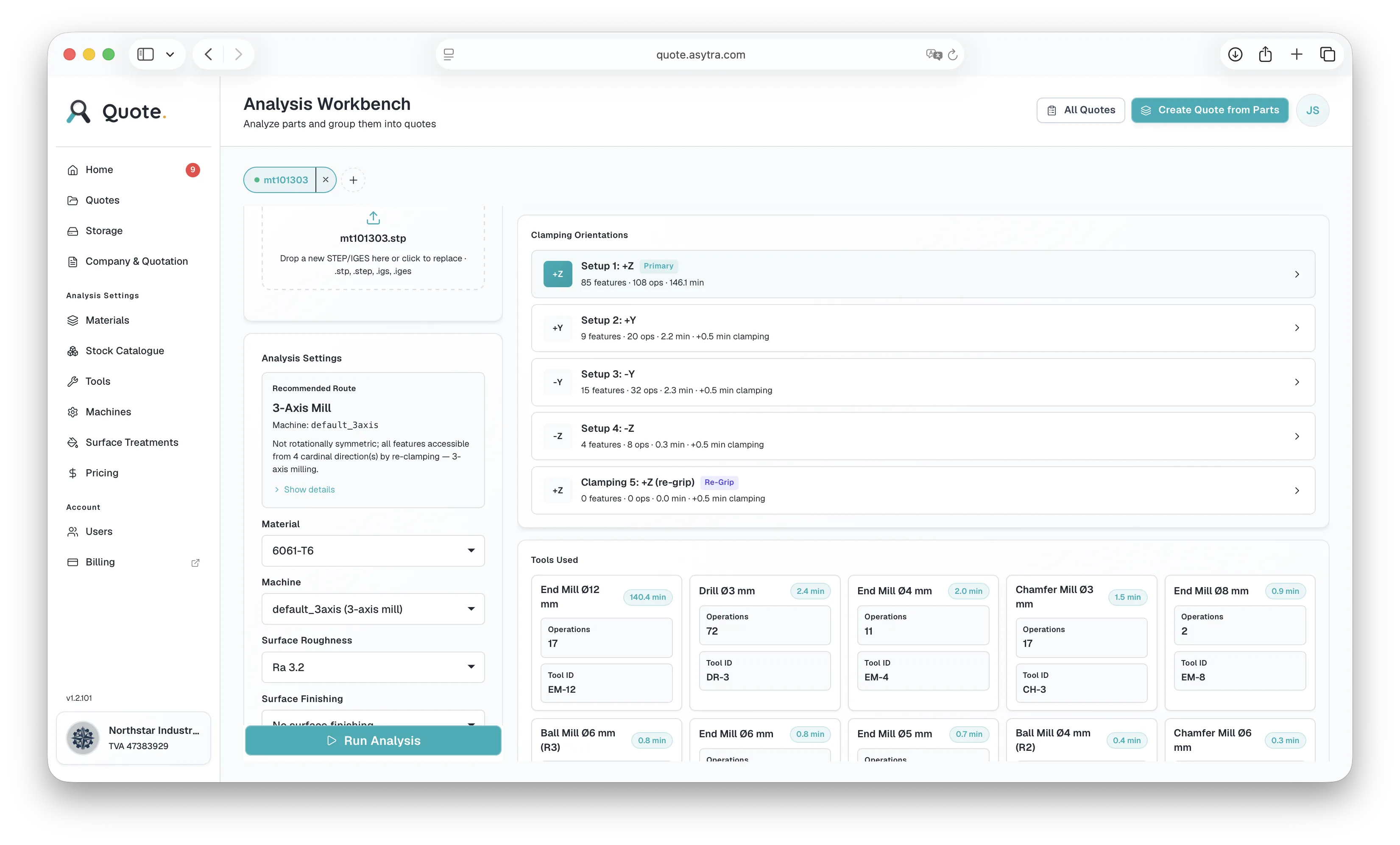
Quote analyses the part geometry and determines whether it should be made on a turning machine, a 3-axis milling machine, or a combination of several machines. It detects when 4-axis machining is required. Cycle time, tooling, setup, and material cost are calculated based on the recommended route and your configured machine rates.

  • Detects turning, 3-axis milling, or combined machining
  • 4-axis detection when indexed or continuous machining is needed
  • Cycle time based on feature-by-feature calculation
  • Quantity-based pricing with setup cost amortisation
Quote clamping orientations, tools used, and recommended machining route for a milled part
Quote materials admin with editable densities, prices, and feed multipliers

Configure everything to match your shop

In the admin section, define your own machines with their capabilities and hourly rates. Add your tool library with cutting parameters. Set up your material stock catalogue with prices. Configure packaging options and surface treatments. Quote calculates prices based on your actual shop, not generic defaults.

  • Add your own machines (3-axis, 4-axis, lathes, mill-turn)
  • Define tool libraries with feeds, speeds, and costs
  • Material stock catalogue with your supplier prices
  • Packaging and surface treatment options
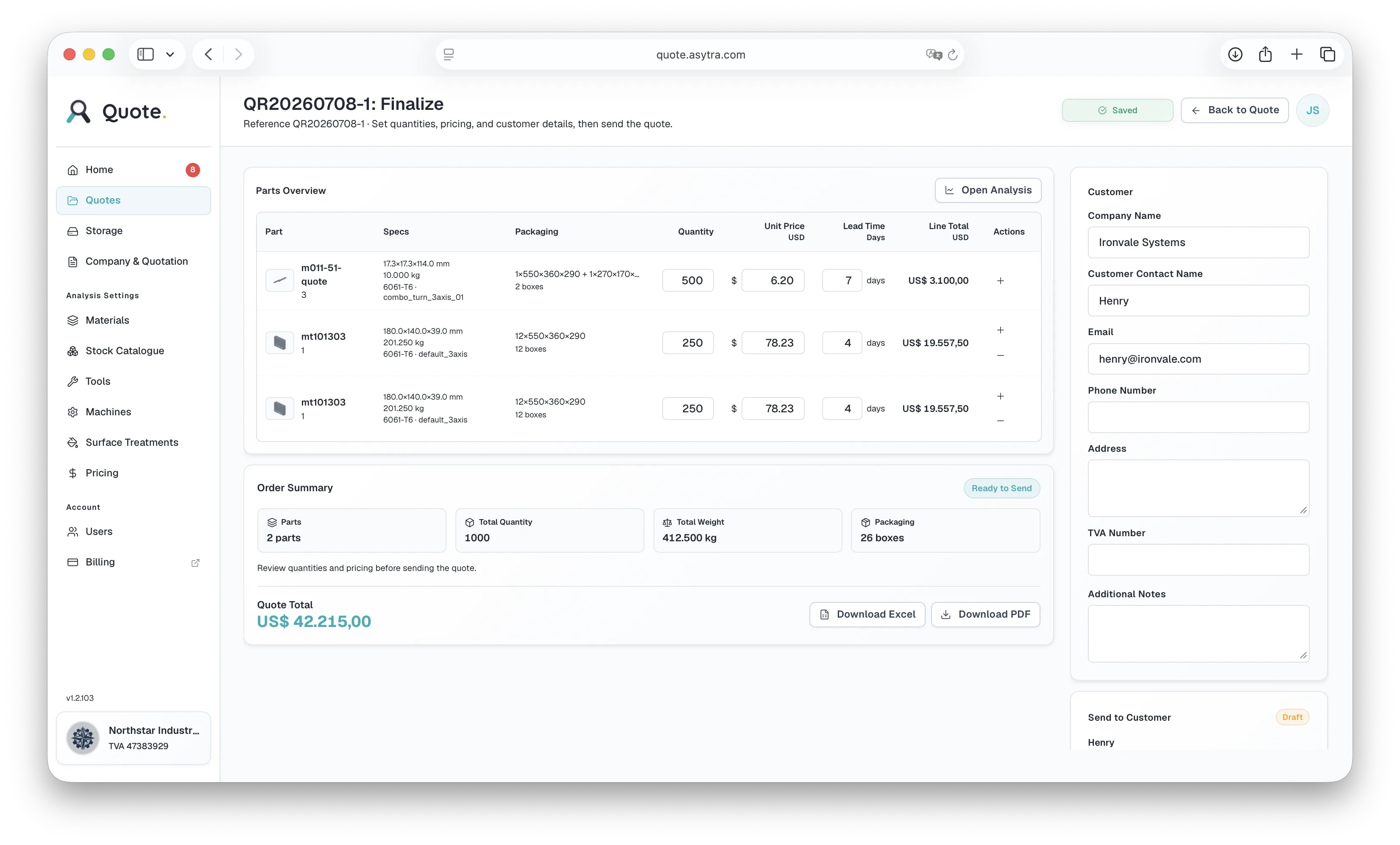
Quote finalize page with parts overview, order summary, and PDF export

Professional quotes ready to send

Bundle multiple parts into one quotation. Set quantities per line item. Export a professional PDF or Excel document with your company details, ready to email to your customer. No more formatting quotations by hand.

  • Multi-part quotes with per-line quantities
  • PDF and Excel export with your company branding
  • Quote history and revision tracking

Stop losing time and leads on manual quoting

Try the live demo above, then register for early access to launch Quote Dashboard and Widget on your shop floor and website.