
Machines Overview
How the Machines page works, what each machine type does to routing, and how Hourly Rate and Part Size Limits decide cost and machine choice.
On this page
The Machines page is where you describe the equipment your shop quotes on. Quote uses each machine's hourly rate to turn cycle time into machine cost, and its size limits to decide which machine can run a part. Open it when you add a machine, change a rate, or find that big parts are going to the wrong machine.
How the Page Works#
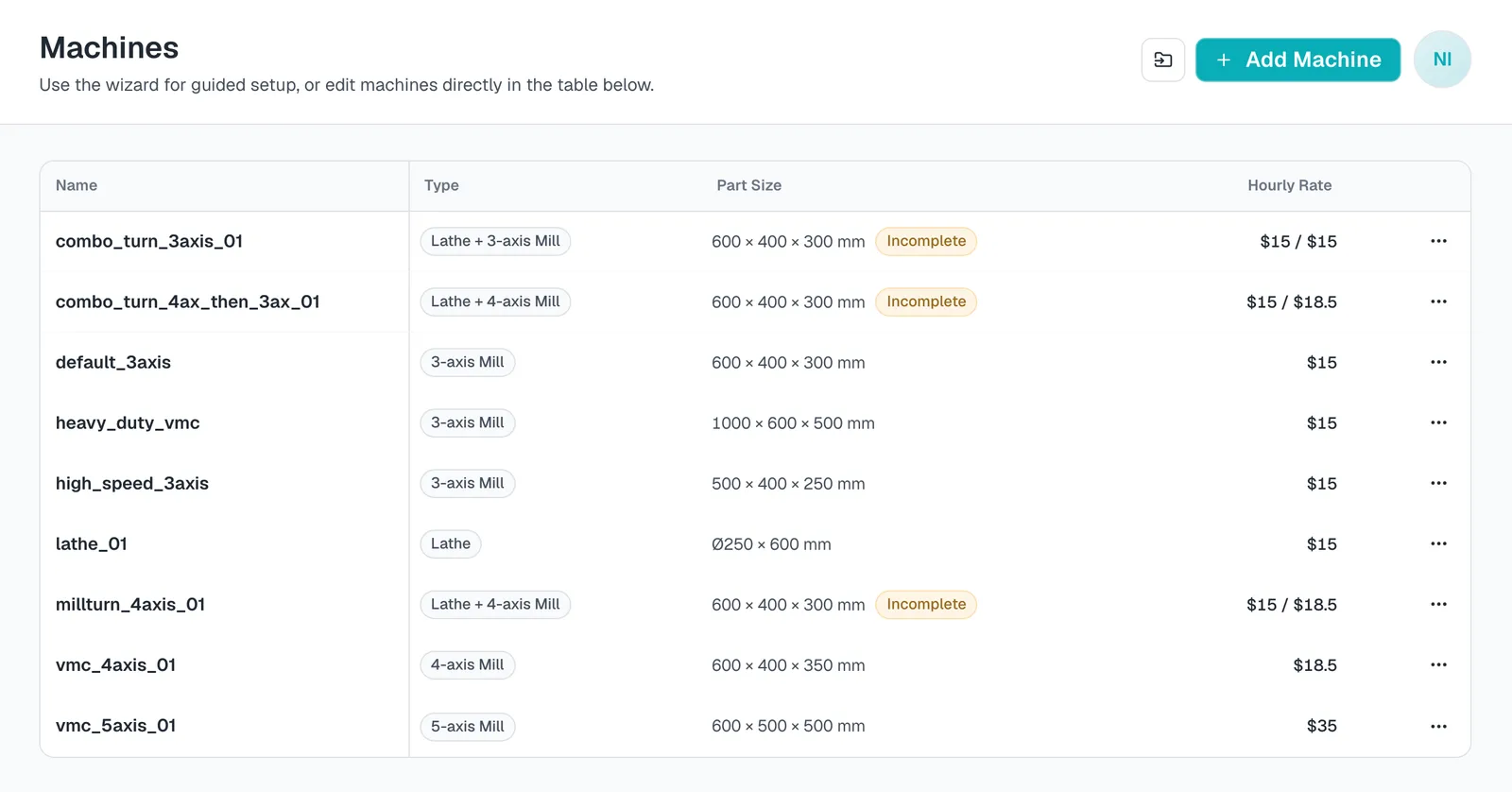
The page is a table with Name, Type, Part Size, Hourly Rate and a row menu. Click a row to open the machine settings in a side panel. Click Add Machine to start a step-by-step wizard.
- Edits save instantly. There is no Save button. A check mark appears beside the row when a field has saved. If a save fails, the old value comes back and a message appears.
- The name is editable in the panel header. If a combo machine uses the machine you rename, check its Linked Machines afterward (see Combo Machines).
- The type is fixed after you create the machine. To change it, delete the machine and add it again.
- Read-only users. If you do not have permission to edit shop settings, the page shows a banner and every field is disabled. Add Machine, import, export and delete are hidden.
- List order matters. Machines stay in the order you created them, and Quote uses that order when it picks a machine automatically (see Part Size Limits).
- Part Size column. Mills show
X x Y x Z mm. Lathes show swing and length. A yellow "Not Set" or "Incomplete" badge means the size limits are missing or partly zero. - Hourly Rate column. A combo machine shows
lathe rate / mill ratefrom its linked machines, or "Not Linked". - Import and export. The page menu exports your machines as a file and imports one back. Importing replaces every machine you have, and it cannot be undone. Export first as a backup.
Warning: Importing a file replaces all existing machines. Export a copy before you import.
Machine Types#
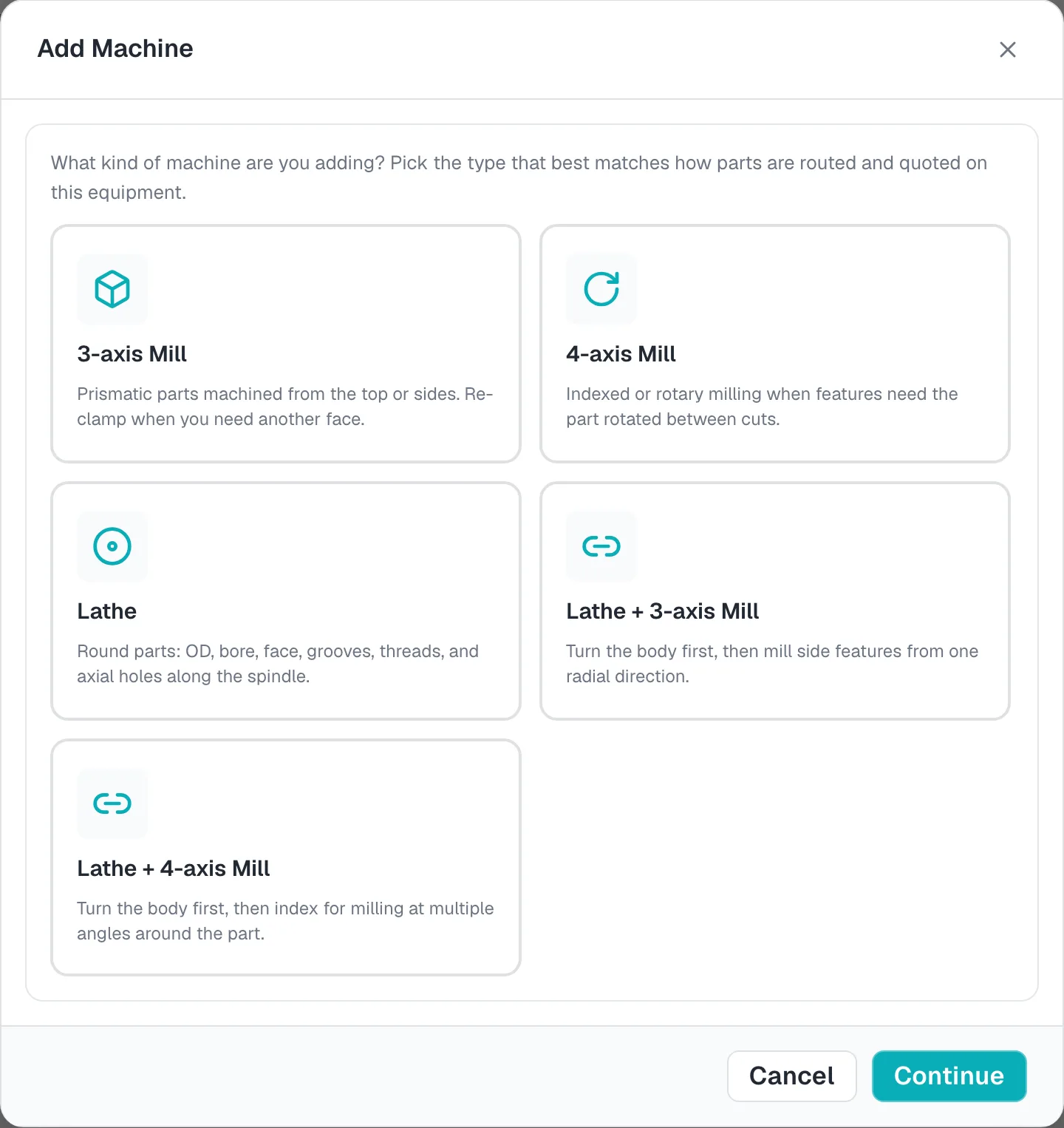
The type decides which settings you see and how Quote plans the part.
| Type | What it is | What it does to routing |
|---|---|---|
| 3-axis Mill | Prismatic parts cut from the top or sides. You re-clamp to reach another face. | Milling route. Every extra face is another setup. |
| 4-axis Mill | A mill with an indexing or rotary axis. | Milling route. Setups around the rotary axis merge into one clamping plus indexes, which lowers clamping minutes. |
| Lathe | Round parts: outside diameter, bore, face, grooves, threads and axial holes. | Turning route. |
| Lathe + 3-axis Mill | Turn the body, then mill side features from one radial direction. | Combined turning and milling route. |
| Lathe + 4-axis Mill | Turn the body, then index to mill at several angles. | Combined route, treated as a true mill-turn machine. |
Existing 5-axis machines still show in the list and edit like a 4-axis mill, but you can no longer add one. Quote does not price 5-axis parts for customers. It detects them and asks the customer for a manual quote.
How Types Rank#
Types form two families, and each family has ranks:
- Milling: 3-axis (1), then 4-axis (2), then 5-axis (3).
- Turning: Lathe (1), then Lathe + 3-axis Mill (2), then Lathe + 4-axis Mill (3).
Quote decides what kind of machine a part needs from its shape. That result is a floor. A higher-ranked machine in the same family can run the part. A lower-ranked one cannot, and you cannot cross from milling to turning. If Quote is not confident about the shape, every type is allowed.
Warning: Only choose a 4-axis type if the machine really has an indexing or rotary axis. A 4-axis type lowers the clamping minutes on parts that need several angles. Do not label a 3-axis machine as 4-axis to get cheaper quotes.
Hourly Rate#
Unit: your company currency per hour. Starting value: 15 (4-axis 18.5, 5-axis 35, lathe 15, combos 0). Where: Machines, side panel, Hourly Rate.
This is what you charge per hour of machine time. Quote multiplies the estimated cycle minutes by this rate:
machine cost = cycle minutes / 60 x hourly rate
The cycle minutes include cutting, rapid moves, tool changes, tool probing, clamping and the small timing allowances described under Timing Allowances. Every minute-based setting on the other Machines pages is billed at this rate.
How it flows to price: Quote adds machine cost to startup, tool wear, material (with scrap), finish, packaging, handoff, deburr and inspection. It applies a yield factor for the quantity tier, then multiplies by the markup for that tier. Markup lives on the Pricing page. See How Prices Are Built.
For combo machines, the Hourly Rate field on the combo itself is ignored. Quote bills turning minutes at the linked lathe's rate and milling minutes at the linked mill's rate.
Change it when: your real cost changes. Enter your cost rate: labor, depreciation, power and overhead for one machine hour. Let the markup on the Pricing page add profit.
Watch out: the starting values are cost rates measured in a reference shop, not market rates, so replace them with your own. If you enter a fully marked-up selling rate here and also keep a 30 to 40 percent markup on the Pricing page, you mark up twice and quote far too high. Pick one place to add profit.
Note: Different rates per machine do not make Quote prefer the cheaper machine. Machine choice is based on size and type (see below).
Part Size Limits#
Unit: mm. Starting value: 600 X, 400 Y, 300 Z. Where: Machines, side panel, Part Size Limits.
Usable X, Y and Z travel of the machine. Quote uses it to check whether a part fits, to show size warnings, and to choose stock. The panel labels are X travel, Y travel and Z travel. The wizard requires each to be greater than 0, and its starting values are 600 x 400 x 300 for a 3-axis mill, with Z 350 for a 4-axis mill.
How the fit check works: Quote sorts the part's three dimensions from largest to smallest and does the same with the machine's three travels. It compares the largest to the largest, the middle to the middle and the smallest to the smallest. The part can be turned any way, so orientation does not matter. If any dimension is over its travel, the machine fails. The same check runs for combo machines, in addition to swing and length.
For plate stock, the stock block must also fit inside the travels. Stock that is too long, wide or thick raises an error that it exceeds the machine's work envelope.
Change it when: always set it to the usable travel with your real workholding, not the catalogue travel. Subtract vise jaws and fixture height from Z.
Watch out: if the limits are zero or blank, the machine "fits anything" and automatic selection becomes meaningless. Lathes with no swing or length set also fit anything. If the limits are too generous, large parts are quoted as feasible and you find out later.
How Quote Picks a Machine Automatically#
- Quote decides the ideal type from the part's geometry.
- It looks at machines of that type, or a higher-ranked one in the same family, whose size limits fit the part.
- It orders them by lowest rank first, then by their position in your machine list.
- It takes the first one.
Quote does not pick the cheapest machine. Hourly rate is not used.
- If a turned part is too big for every lathe and combo, Quote reroutes it to a fitting 4-axis mill, then a 3-axis mill, and flags the quote as capacity downgraded.
- If nothing fits anywhere, Quote quotes on the closest machine (the fewest dimensions over the limit) and flags it for review.
- An operator can still choose another compatible machine on the analysis screen. Machines in a lower rank are blocked, and the message says which types are acceptable.
Tip: To make Quote prefer your cheaper small mill, size it honestly and make sure it was created before your larger machines. There is no drag-to-reorder on this page.
Interactions and Common Mistakes#
- Rate and markup. Machine cost uses the Hourly Rate, then the Pricing page markup multiplies the whole subtotal. Use a cost rate here, not a selling rate.
- Setup counted twice. Machine setup minutes (Milling Clamping Time, Chuck Clamp, Collet Clamp, Flip Clamp, program start and end) are billed on every part at the hourly rate. The startup fee on the Pricing page is a separate once-per-order charge divided by quantity. If you price setup as a flat order fee, keep the machine minutes small. See Setup and Minimum.
- The cheapest machine is not chosen. A more expensive machine is not skipped because another one costs less per hour.
- Blank or zero limits mean no limit. A mill with 0 for X, Y or Z, a lathe without swing or length, and a 4-axis mill without Max Rotary accept any part. Fill them in.
- Missing combo links zero out machine cost. See Combo Machines.
- Max Feed is a ceiling. It only lowers feeds that tool and material settings give. It never raises them.
- The wizard's Lathe Clamping Time is not billed. After you create a lathe, open it and set Chuck Clamp, Collet Clamp and Flip Clamp. See Lathe Settings.
- Max RPM only affects lathes. Milling cutting speed comes from tool and material settings.
- Changing company currency scales the hourly rate and other money settings at the current exchange rate, after you confirm.
- 5-axis parts are never priced for customers. They go to manual quote, so 5-axis rows mostly matter for internal estimates.
Timing Allowances Not Shown on This Page#
A few small timing allowances are added to every part but are not shown on the Machines page: approach and retract, repositioning between features, drill cycle, tap cycle, and program start and end. They are billed at the hourly rate along with the rest of the cycle. You cannot adjust them here.
Defaults#
The Starting Value column is what a new company is seeded with. The Wizard Default column is what the Add Machine wizard fills in for a new machine.
| Setting | Starting value | Wizard default | Notes |
|---|---|---|---|
| Hourly Rate | 15 (4-axis 18.5, 5-axis 35) | 3-axis 75, 4-axis 95, 5-axis 130, lathe 65 | Combos 0, rates come from linked machines |
| Max Feed | blank (no cap) | 10000 (lathe 0) | mm/min |
| Rapid XY / Rapid Z | 30000 / 15000 | 30000 / 15000 | mm/min |
| Tool Change | 5 s | 18 s | |
| Tool Probe | 0.1 min | 0.1 min | |
| Clearance Plane | 5 mm | 5 mm | |
| Milling Clamping Time | 1.2 min | 3.0 min | |
| X / Y / Z Travel | 600 / 400 / 300 mm | 600 / 400 / 300 mm | |
| Max Rotary | 220 mm (4-axis), 400 mm (5-axis) | same | |
| Rotary Index | 3.0 s | 1.5 s | |
| Max Swing / Max Length / Max Bar | 250 / 600 / 65 mm | same | |
| Max RPM / Min RPM | 6000 / 50 | 6000 / 50 | |
| Turret Stations | 12 | 12 | |
| Turret Index | 5 s | 1.0 s | |
| Manual Tool Swap | 5 min | 2.0 min | |
| Chuck Clamp / Collet Clamp / Flip Clamp | 0.29 / 1.5 / 0.17 min | 3.0 / 2.5 / 3.0 min | |
| Bar Feeder | On (seeded lathe) | Off | |
| Handoff Cost | 5 | 5 | |
| Combo Mill Transition | 0.0167 min | 0.5 min |
Seeded Example Machines#
A new company starts with these machines.
| Machine | Type | Notes |
|---|---|---|
| default_3axis | 3-axis Mill | Rates and limits as in the table above |
| heavy_duty_vmc | 3-axis Mill | 1000 x 600 x 500 mm travel, rapids 20000 / 10000 |
| high_speed_3axis | 3-axis Mill | 500 x 400 x 250 mm travel, 40000 RPM, rapids 50000 / 30000 |
| vmc_4axis_01 | 4-axis Mill | Max Rotary 220 mm, hourly rate 18.5 |
| vmc_5axis_01 | 5-axis Mill | Legacy type, hourly rate 35 |
| lathe_01 | Lathe | 250 / 600 / 65 mm swing, length, bar. Bar Feeder on |
| millturn_4axis_01 | Lathe + 4-axis Mill | Linked to lathe_01 and vmc_4axis_01 |
| combo_turn_3axis_01 | Lathe + 3-axis Mill | Linked to lathe_01 and default_3axis |
| combo_turn_4ax_then_3ax_01 | Lathe + 4-axis Mill | Linked to lathe_01 and vmc_4axis_01, secondary mill default_3axis |
These are examples. Replace the rates and limits with your own, and delete the machines you do not own.
Related Pages#
Last updated