

Keypad for the Tablet
A bench layout with big keys, so a gloved thumb can enter the value without leaving the drawing.
Drawing Read Automatic
24 dimensions
Balloon 3 · Bore Pass
12.01 mm
First Article Report Ready
First-article inspection means reading a print, writing values on paper, then typing them into a spreadsheet. Measure keeps the print, the values, and the report in one place, so nothing gets transcribed twice.
Free to start, with usage limits. Included with Trace Pro and every Quote plan.
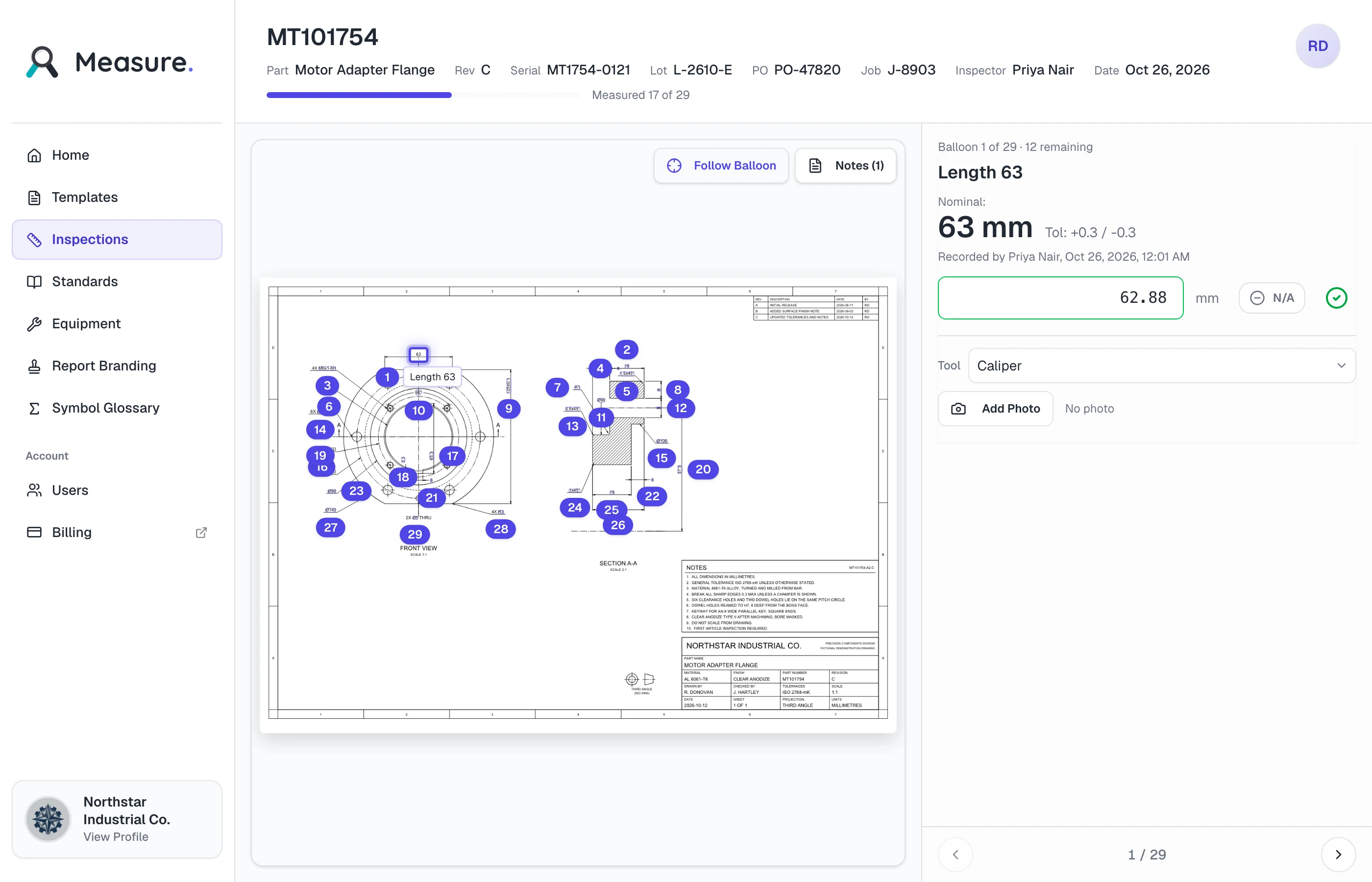
Pick a balloon on the drawing, enter what your gage read, and see pass or fail against the tolerance. This is the same loop an inspector runs in Measure.
Measured 0 of 7
Measure judges each balloon against its tolerance as you enter the value. Turn on JavaScript to try seven characteristics on a sample housing cover plate.
First-Article Report Ready
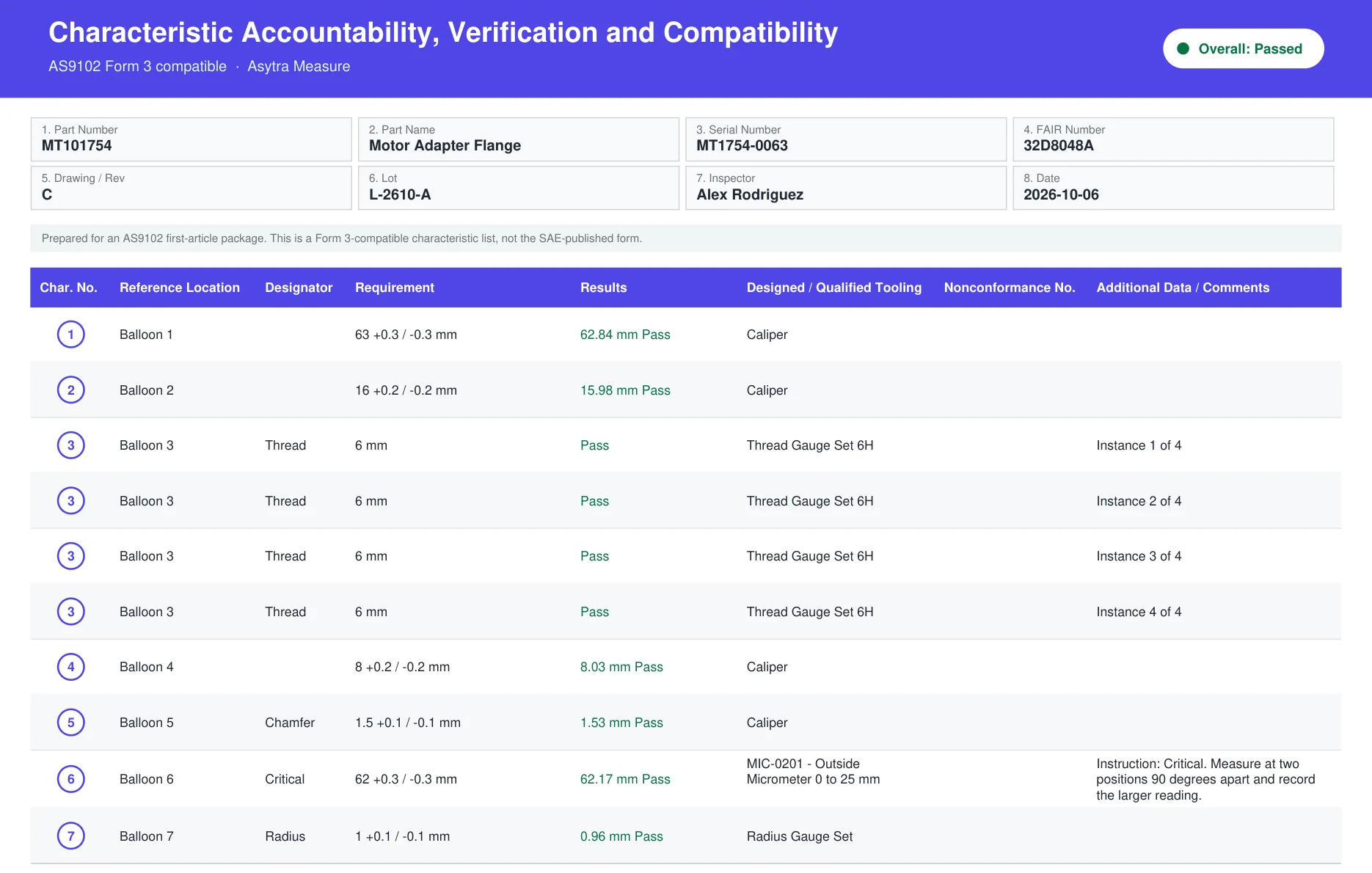
Every value, tool, and result is on the report, with the ballooned drawing to match. In Measure, you download the pack from here.
Start FreeA fictional sample part. Nothing you enter here is saved or sent.
Four moments in a first article, and what changes at each one.
01 / 04
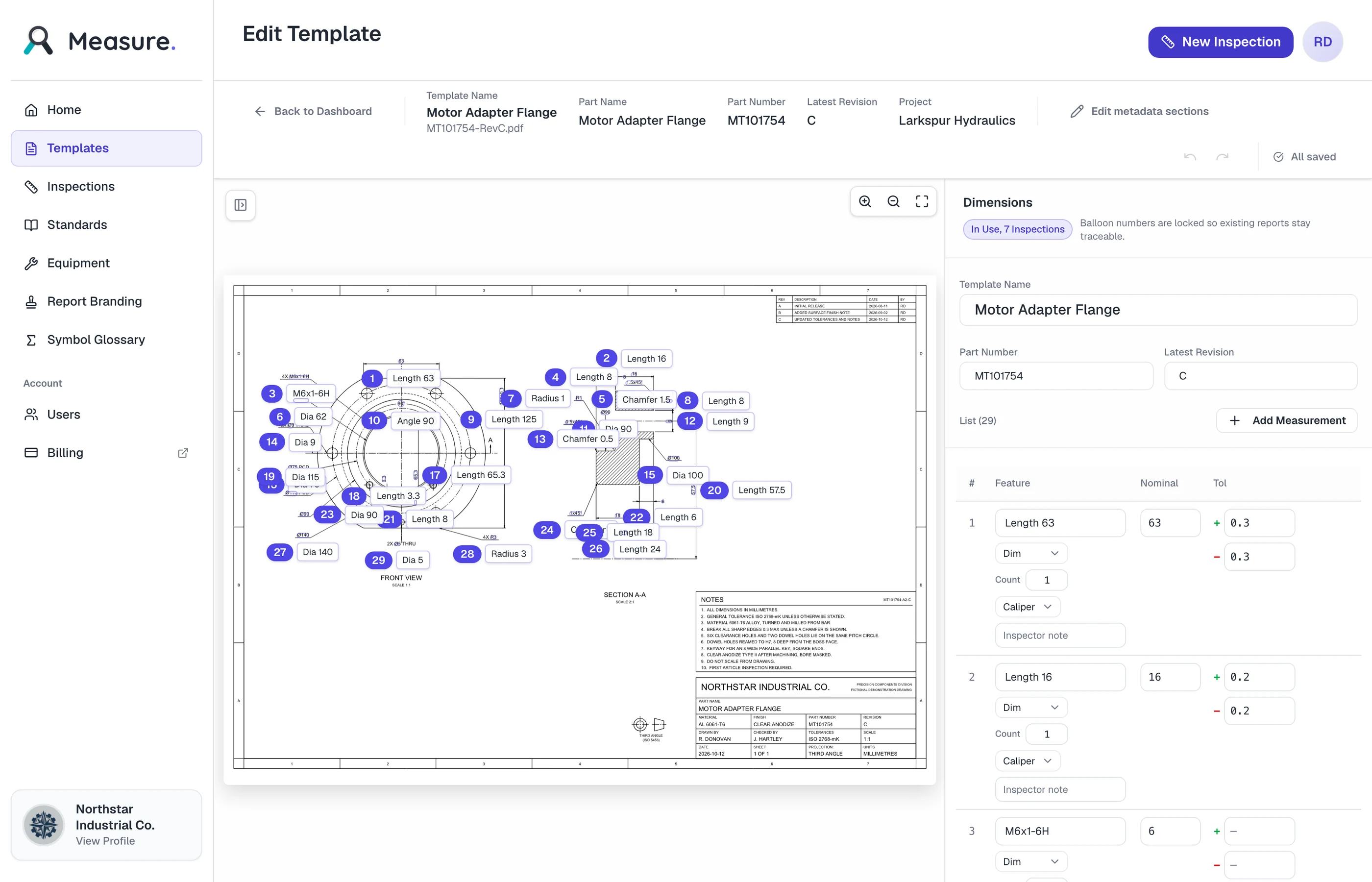
BeforeRetyping every dimension into a spreadsheet.
With MeasureUpload the PDF and get a ballooned draft to review.

02 / 04
BeforeSquinting at a photocopy to find every dimension.
With MeasureUpload the scan, then check each reading on the drawing.
03 / 04
BeforePencil values on paper, type them in later.
With MeasureEnter the value on the drawing and see pass or fail at once.

04 / 04
BeforeHours assembling the report by hand.
With MeasureDownload the pack the customer asked for.
When every row has a value or N/A, download the report in the format the customer expects, with your logo and footer on it.
Part and inspection details, the overall result, then every characteristic with its requirement, measured value, and method.
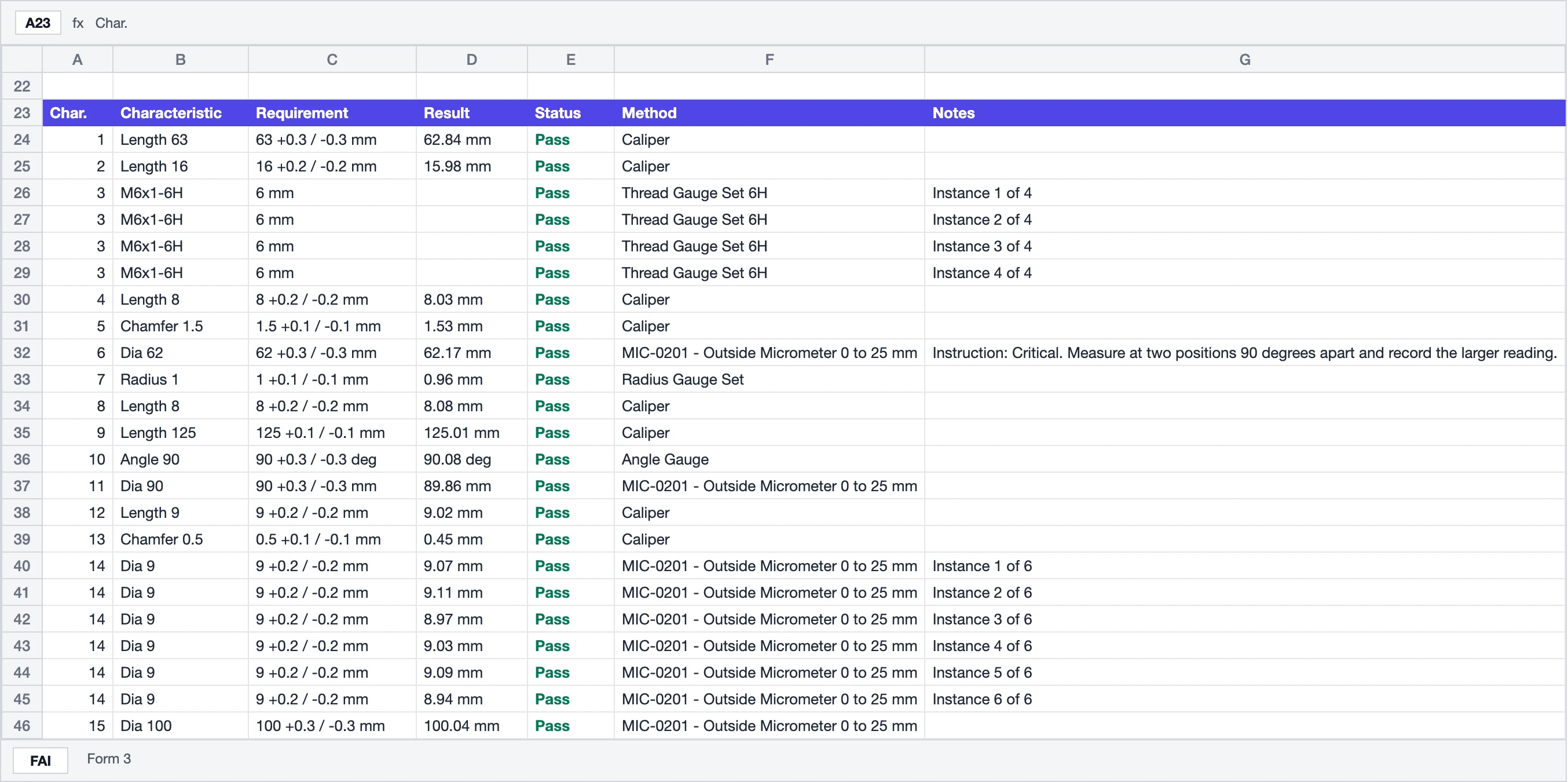
The characteristic sheet laid out for AS9102 Form 3, with the tooling and comments for each characteristic. It is Form 3-compatible, not the SAE-published form, and the sheet says so.
The same report as a workbook, with one sheet for the first-article report and one for the Form 3 layout, ready to open in Excel.
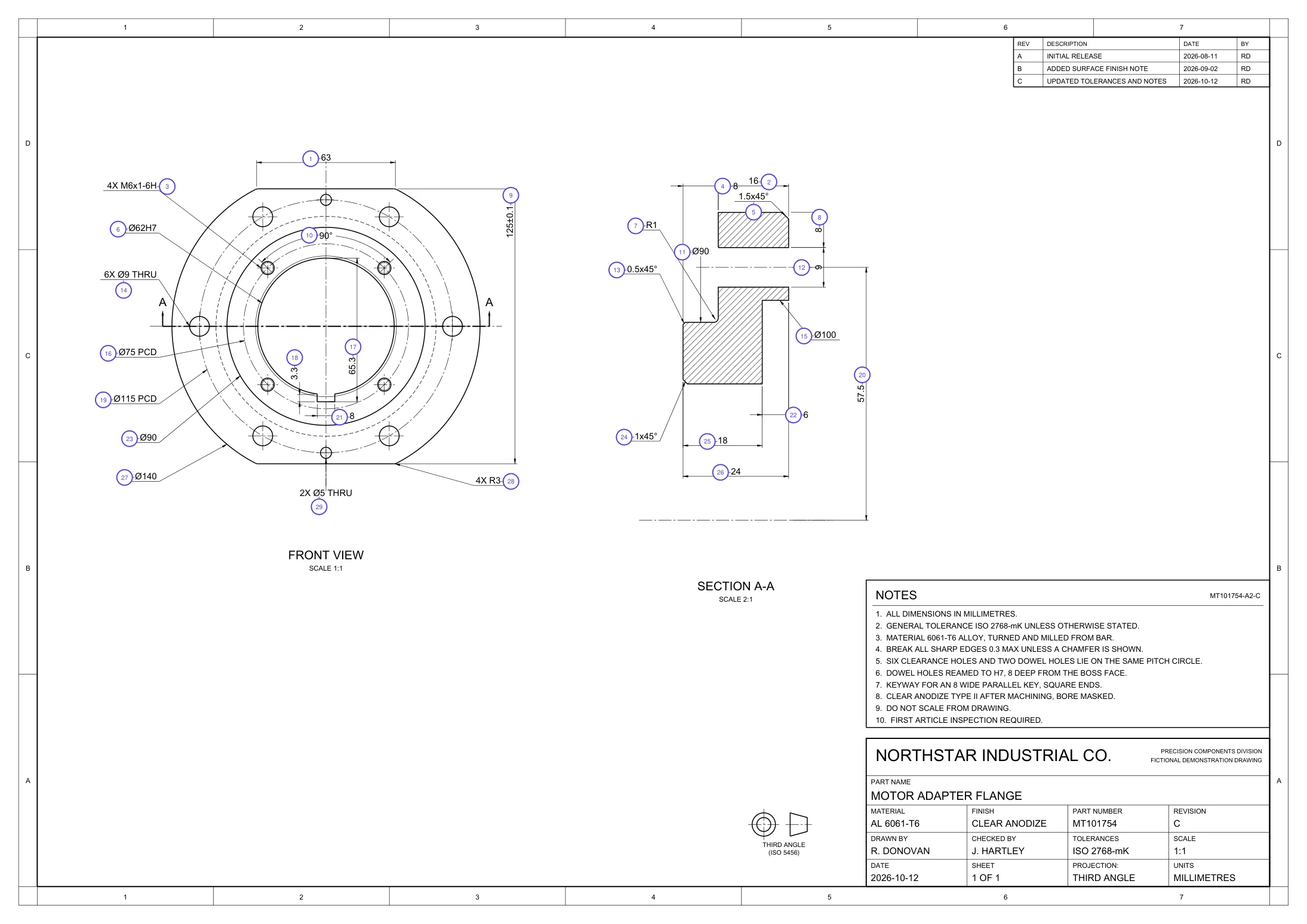
The drawing as a PDF with every balloon numbered to match the report, so your customer can find each characteristic on the print.
One row for every reading of every completed inspection, for any date range, as CSV or PDF. The PDF carries your logo and footer.

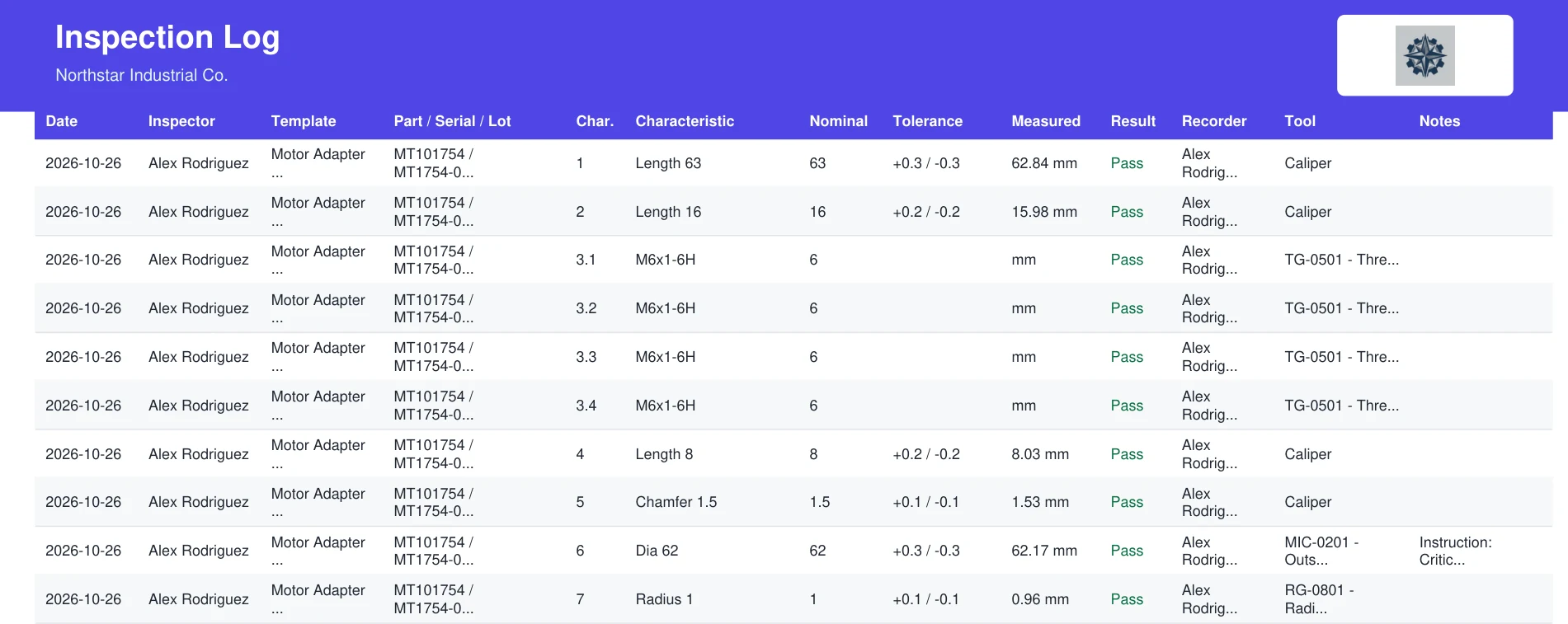
Set the header name, title, footer, and color, and add your logo on paid plans. A live preview shows the report as you change it.

Upload a multi-page PDF, or a JPG or PNG. Measure reads the title block, the dimensions and tolerances, and the geometric callouts, then balloons every characteristic on the drawing. It is a first draft you correct on the print, not a verdict you have to trust.


Many prints arrive as a scan. When a drawing has no selectable text, Measure tells you before it starts, reads the characteristics from the image, and lists them for you to review.
A scanned drawing counts as one drawing read, the same as any other upload.
Extraction is a draft. Click a balloon on the drawing to fix a value, drop anything you will not inspect, and save the result against that revision. The next inspection starts from your corrected values.


Work one balloon at a time. The drawing follows the balloon, the tolerance sits next to the entry field, and pass or fail appears as soon as the number goes in.
Open inspections, failed runs, and the templates behind them, so the next first article starts where the last one left off.

Record values on a tablet, add photo evidence from a phone, and see the result before you leave the part.
A bench layout with big keys, so a gloved thumb can enter the value without leaving the drawing.

Scan the QR code on a measurement, take the photo on your phone, and it is attached right away.

Progress shows how many balloons are measured. When the last one is in, the result is Passed or Failed.
An auditor will ask which instrument took each reading and whether it was in calibration. Measure keeps the register, names the tool on the report, and can stop an inspection from closing with an expired one.


It does first-article inspection well, and it says where that stops.
Measure is not a quality-management system. It keeps the print, the values, and the report for each first article.
It records what your instruments read. It does not program or drive a CMM.
The Form 3 sheet is laid out for AS9102 and marked as compatible. It is not the SAE-published form.
Measure uses the same company login and users as Trace and Quote, and you do not need either to use it. It is included with Trace Pro and every Quote plan, for every user.
Unretouched screens from the running product. Pick an area, then click any thumbnail to read it full width.
Screenshots from the Measure app. Documentation covers templates, inspections, and exports.
Only turning a new drawing into a template uses a drawing read. Inspections and reports are unlimited on every plan.
$0
10 drawing reads a month
$29 per month
50 drawing reads a month
$99 per month
250 drawing reads a month
Pro and Team can add packs of 25 reads for $10, and bought reads do not expire. Measure is included with Trace Pro and every Quote plan, for every user, at no extra charge.
PDF prints, including multi-page sheets, plus JPG and PNG. Measure pulls dimensions, tolerances, and title-block data out of the file, and reads scanned prints from the image. Extraction is a first draft you correct on the drawing, not a verdict you have to trust.
Yes. When a drawing has no selectable text, Measure tells you it looks like a scan and reads the characteristics from the image instead. Scans take longer, and every reading has to be checked against the drawing before it is used. A scanned drawing counts as one drawing read, like any other.
No. Measure exports a characteristic sheet laid out for AS9102 Form 3, alongside a generic first-article report, Excel sheets, and the ballooned drawing. The sheet says it is Form 3-compatible and not the SAE-published form. Measure is not a quality-management system, and it does not program a CMM.
You fix it where you spotted it. Click a balloon on the drawing to correct its value, drop anything you will not inspect, and save the template against that revision. The next inspection starts from your corrected values, not from a fresh extraction.
Metric and inch drawings. General tolerances can follow ISO 2768 (c, f, mK, or v) or a standard you define yourself, such as a shop default for inch drawings that carry no tolerance block.
Add your instruments to the equipment register with their calibration due dates. Choose the tool for each characteristic and the report names it. You can also block completing an inspection while a tool is past its calibration date.
Yes. The inspection screen has a bench layout with a large keypad for tablets and phones. You can also add photos from a phone by scanning the QR code on the inspection.
No. Measure stands on its own and shares the same company login. If you already run Trace Pro or Quote, Measure is included for your users. Trace still owns the build record for each serial number; Measure owns the print.
Every completed inspection exports as a report pack, and the inspection log exports as CSV or PDF for any date range. Your drawings, templates, and inspection records belong to your company.
You can start free. The Free plan includes 10 drawing reads a month, one user, and unlimited reports. Measure is also included with Trace Pro and every Quote plan, for every user, at no extra charge. See Measure pricing for the plans.
A drawing read is one uploaded drawing turned into a template. Running inspections and exporting reports do not use reads, and a failed read is refunded. Reads renew each month. Pro and Team can add packs of 25 reads, and bought reads do not expire.
Upload a print, run the inspection on the drawing, and export the first-article report your customer asked for.
See Measure pricing for plan details. Trace Pro and every Quote plan include Measure for every user.