
What a balloon actually is
It is worth starting with the idea, because the word sounds more elaborate than it is.
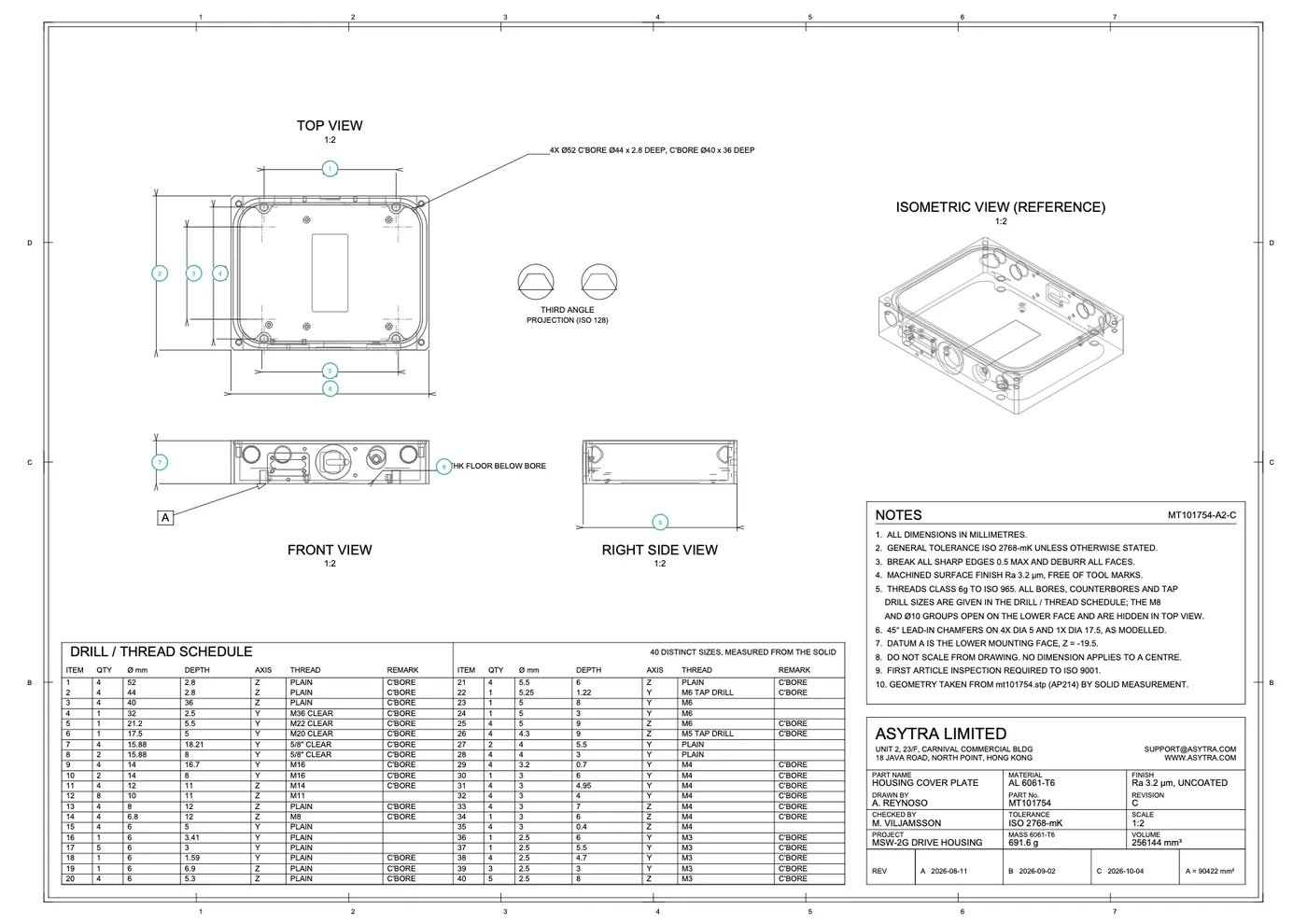
Ballooning a drawing means putting a numbered marker next to each feature you intend to verify. The number is the whole point. Once every characteristic has a number, the inspection report can refer to balloon 4, the ballooned drawing shows balloon 4, and the two documents are talking about the same thing.
Without that link, a report row reads something like "cover plate, width, 140 plus or minus 0.5". Six months later, when someone asks why that characteristic is on the report at all, there is no way to tell whether it came from the drawing or from someone's memory of a similar part. Ballooning is what turns a list into evidence.
It is also why ballooned drawings appear as an export rather than only as a view. When the report leaves your building, the ballooned drawing goes with it.
The manual method
Ballooning by hand is not difficult, which is why it survives so long. You open the drawing, find each dimension, and type a number in a small circle next to it. Twenty balloons on a part is an hour's work. On a drawing with sixty it is most of a morning.
Three things make it worse than it looks:
- Renumbering. Numbers must run 1, 2, 3 in order, because the report lists them in that order. Delete balloon 12 on a sixty balloon drawing and something has to close the gap. Doing that by hand means renumbering everything after it.
- Deciding which features get one. This is the part people underestimate. Some dimensions are worth verifying and some are not obvious from the drawing. Two people ballooning the same drawing can produce different lists, and both can be defensible.
- Doing it again next revision. When the drawing changes, some balloons move, some stay, and the honest answer is usually to start the numbering again.
None of that is hard. It is just repetitive enough that nobody enjoys it, which makes it a good candidate for a machine.
What Measure does instead
When you upload a drawing to Measure, it is analysed. The extractor reads the drawing, identifies the characteristics, places a numbered balloon on each one, and numbers them in sequence.
You do not place balloons. You review them.
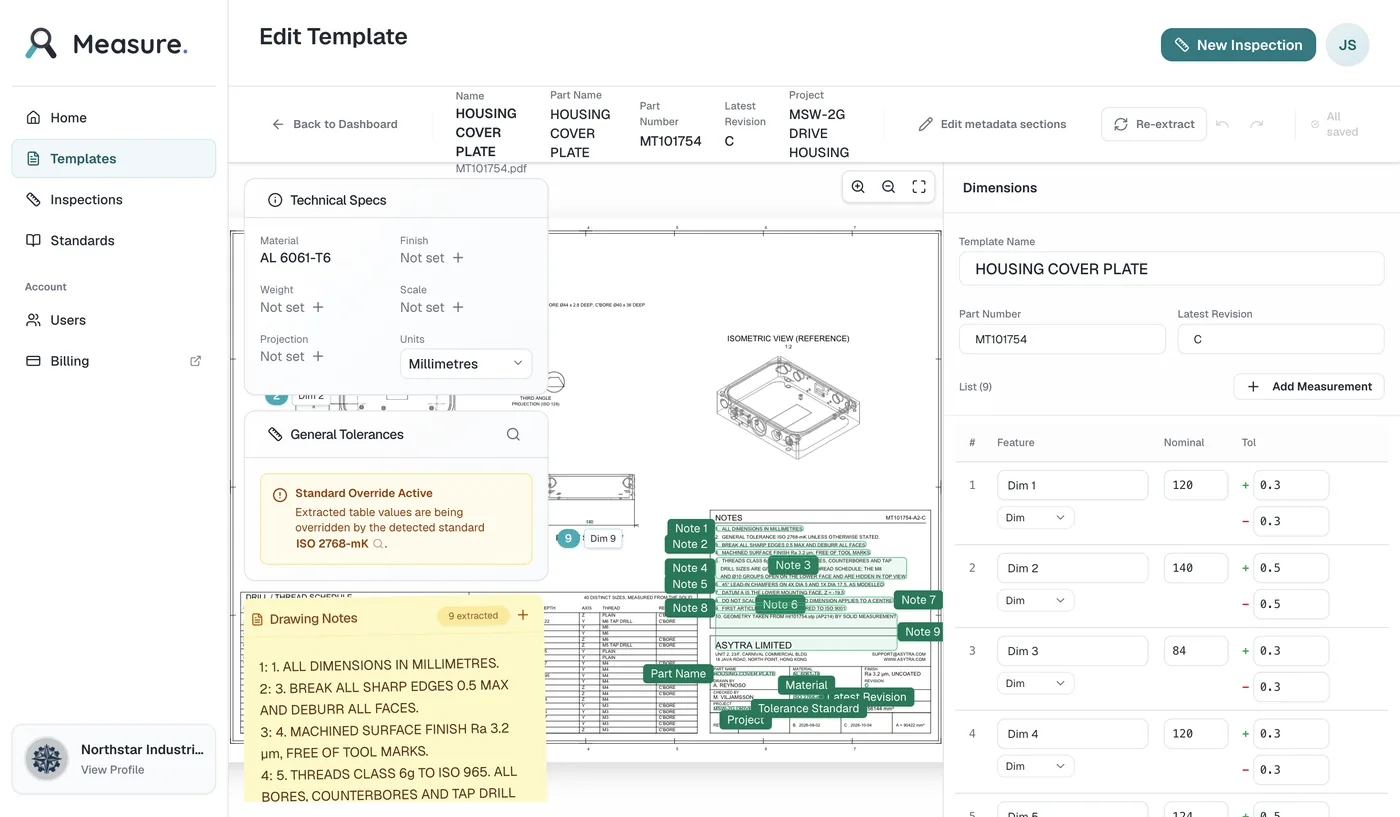
Two details about the screenshot above are real and worth not glossing over. The editor shows note balloons and metadata markers on the drawing as well as the dimension balloons, and there is no control to hide them. And the balloons the extractor placed are correct but unstyled, because the system does not know what your shop calls anything yet.
The review step, which is the actual job
Extraction produces a complete first draft. It is not the finished answer, and the difference matters.
What you control is the characteristic behind each balloon. The balloon number itself is read only, because renumbering it by hand is exactly the error-prone step the automation exists to remove. Around it, though, you have full control:
- Names. "Dim 1" is what the extractor calls a characteristic until you give it a better one. "Cover plate width" is worth the extra thirty seconds, because the person measuring it at 6 PM does not know what Dim 1 means either.
- Nominal values and tolerances. These come across from the drawing, and they come across as read. Correct anything on a feature that matters.
- Deletions. The extractor sometimes picks up a line, a note, or a dimension that is not something you inspect. Delete it and the numbering closes the gap automatically, so you end up with a clean run of numbers rather than a gap.
- Additions. If the drawing genuinely does not show a dimension you need to verify, add it. It is given the next free balloon number automatically.
- Renumbering. If numbering has ended up out of sequence, a renumber action puts it back to 1, 2, 3 in the order shown. It only appears when the numbering actually needs it.
The point of all this is that you are confirming and correcting, not transcribing. Reading a list the machine produced and fixing two entries is quick. Typing twenty rows from a drawing is not, and it is where mistakes happen.
The same numbers in both documents
The payoff is that the inspection report and the exported ballooned drawing share one numbering. Every row in the report carries its balloon number, and the ballooned drawing carries the same numbers on the same features.
So when a customer or an auditor asks why a particular dimension is on the report, the answer is a number, and the number points at a callout on the drawing. That is the whole reason ballooning exists, and it is why the numbering is automatic rather than manual. Manual numbering is one more thing to maintain by hand for no benefit.
Where it fits in the wider job
Balloons are one step in producing an inspection report, and the step before them is getting the characteristics off the drawing in the first place. That is covered in how to create a first article inspection report from a drawing, which walks through the whole process from upload to export. For background on what a first article inspection is, see what a first article inspection involves.
If you want to see what a set of report templates looks like before you commit, measuring report templates covers the formats and when each one is appropriate.
Getting started
Measure is included with Trace Pro and every Quote plan. Companies without one of those can start free during early access with usage limits, or request access. Limits and paid options are on the Measure pricing page.
If you try this, use a drawing you have already inspected by hand. Balloon the same part both ways and compare the lists. The interesting output is not the time saved. It is the differences, which tell you things about your drawings that you did not know.
Frequently asked questions
A balloon is a numbered marker that links one characteristic on a drawing to one row in an inspection report. The number is the reference, so a measured value can be traced back to a specific callout rather than to a description of one. It is what makes a report auditable.
No. In Asytra Measure the balloon numbers are assigned automatically when a drawing is analysed. The extractor reads the drawing, identifies the characteristics, places a numbered balloon on each one, and numbers them in sequence. You review the result and correct anything that is wrong rather than positioning balloons yourself.
The balloon number itself is read only. What you control is the characteristic behind each balloon: its name, its nominal value, and its upper and lower tolerance. You can also delete a characteristic the extractor picked up that is not really something to verify, which closes the gap in the numbering, and renumber the whole set back into sequence if needed.
Both happen, and the review step exists for exactly that reason. A characteristic that was missed can be added as a measurement, and it is given the next free balloon number automatically. One that was picked up in error can be deleted. Neither leaves a gap in the numbering.
Yes. That is the point of the numbering. The inspection report and the exported ballooned drawing share the same balloon numbers, so any row in the report can be traced straight to its callout on the drawing.