
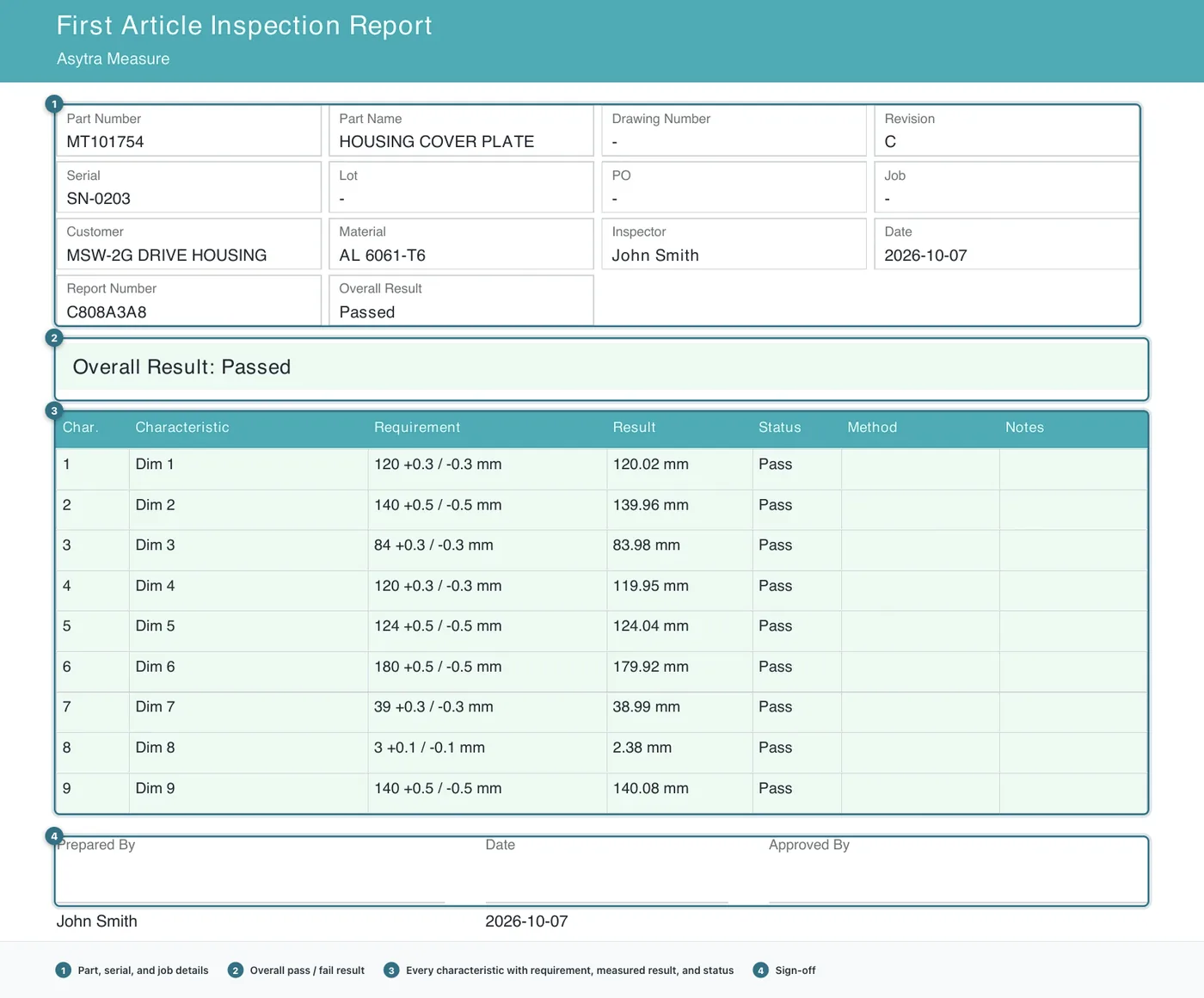
What a first article report has to contain
Our earlier article on what a first article inspection actually is covers the background. This one is about producing the document.
A usable report needs four things, and it is worth being precise about them because most incomplete reports are missing one of these rather than being generally bad:
- Job identification. Part number, description, revision, serial number, quantity, customer, and who did the work. A report that cannot be tied back to one specific lot is not evidence of anything.
- Every characteristic being verified, with its nominal value and the tolerance it is allowed to vary by. This is the core of the report and the part most likely to be assembled by hand.
- A measured result and a pass or fail status for each one. Both, not either. A column of measured values with no verdict leaves the reader to work out whether they are good.
- A sign-off from the inspector and from whoever approved the result.
Everything above sits on top of a drawing or a ballooned drawing showing which characteristic is which. Without that reference, a row reading "Dim 3, 84 plus or minus 0.3" means very little six months later.
Why the manual method breaks
Most shops build these in a spreadsheet, and the process goes roughly like this:
- Open the drawing, usually as a PDF alongside the STEP file.
- Read each dimension off the drawing and type it into a spreadsheet row.
- Add the tolerance, which is usually written as a general tolerance note rather than per dimension.
- Measure the part and type the results into the same rows.
- Work out pass or fail by eye, or with a formula that breaks the first time someone leaves a cell blank.
- Format it, add a header, and chase down a signature.
Two things go wrong with this, and only one of them is about time.
The first is speed, which is the obvious one. On a drawing with twenty characteristics you are retyping a page of numbers before you have measured anything, and then doing it again for the next revision.
The second is error, and it is the more expensive problem. A general tolerance note on a drawing might read "linear tolerances per ISO 2768-mK". Applying that correctly to each dimension means understanding which class applies to which feature, and a spreadsheet makes it very easy to apply one tolerance to everything. A characteristic that should be plus or minus 0.1 gets plus or minus 0.5, the part passes, and nobody finds out until the customer rejects it.
There is a third, quieter issue. The dimensions that end up on the report are the ones someone remembered to type. A characteristic that was skipped is invisible, because the report is a list and a list has no way of showing what is missing.
Building it from the drawing instead
Asytra Measure takes a different approach. You upload the drawing once, and it reads the drawing to produce the characteristic list for you. The measuring still happens on the shop floor, with calipers, micrometers, or whatever your shop actually uses, but the data entry step largely disappears.
The workflow is:
- Upload the drawing. Vector drawings and scanned pages both work. A scan is read the same way, so a paper drawing is a valid starting point.
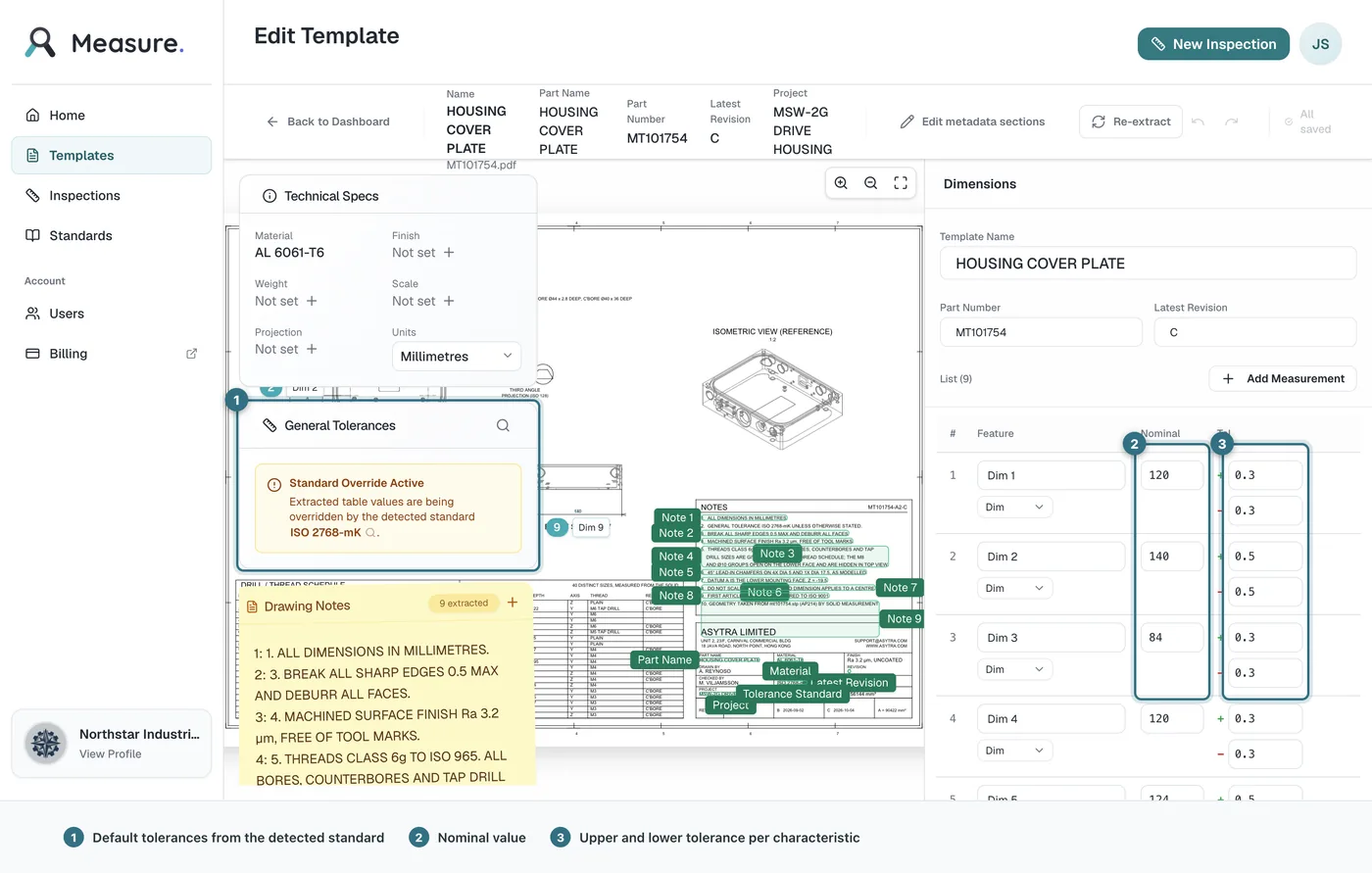
- Review the extracted characteristics. Every dimension, tolerance, and drawing note comes back as a row you can edit. This is the step that matters, and it is where your judgement belongs.
- Correct what the extraction got wrong. Rename characteristics so they mean something to the person who will inspect them, adjust tolerances, and delete anything that is not actually a characteristic to verify.
- Save it as a template. One template per part, reusable across every revision and every serial number.
- Run the inspection. Each characteristic is entered in turn, with pass or fail worked out for you as you type.
- Export the report. The completed report, with job details, results, status, and sign-off.
The review step is the real work
It is tempting to describe extraction as the finished job. It is not, and the difference matters.
Extraction gets you a complete first draft. It does not know which dimension your customer actually cares about, which of two similarly placed features is the one that matters, or what your shop calls a feature internally. Those are judgement calls, and no amount of processing will make them for you.
What extraction does is make the review cheap. You are not typing numbers and hunting for them; you are reading a list and confirming or correcting it. On a typical part that turns the slowest, most error-prone part of the job into the fastest part to check.
The tolerance handling is worth a specific mention. When a drawing carries a general tolerance note, Measure applies the detected standard to the extracted values, so each characteristic gets the tolerance that actually applies to it rather than one blanket figure for the whole drawing. You can override any of it, and you should review the ones on critical features.
What you get at the end
The exported report is the document described at the top of this article: job identification, every characteristic with its requirement, the measured result, a pass or fail status, and a sign-off. Alongside it you can export the ballooned drawing, so each balloon number in the report is traceable to a callout on the drawing.
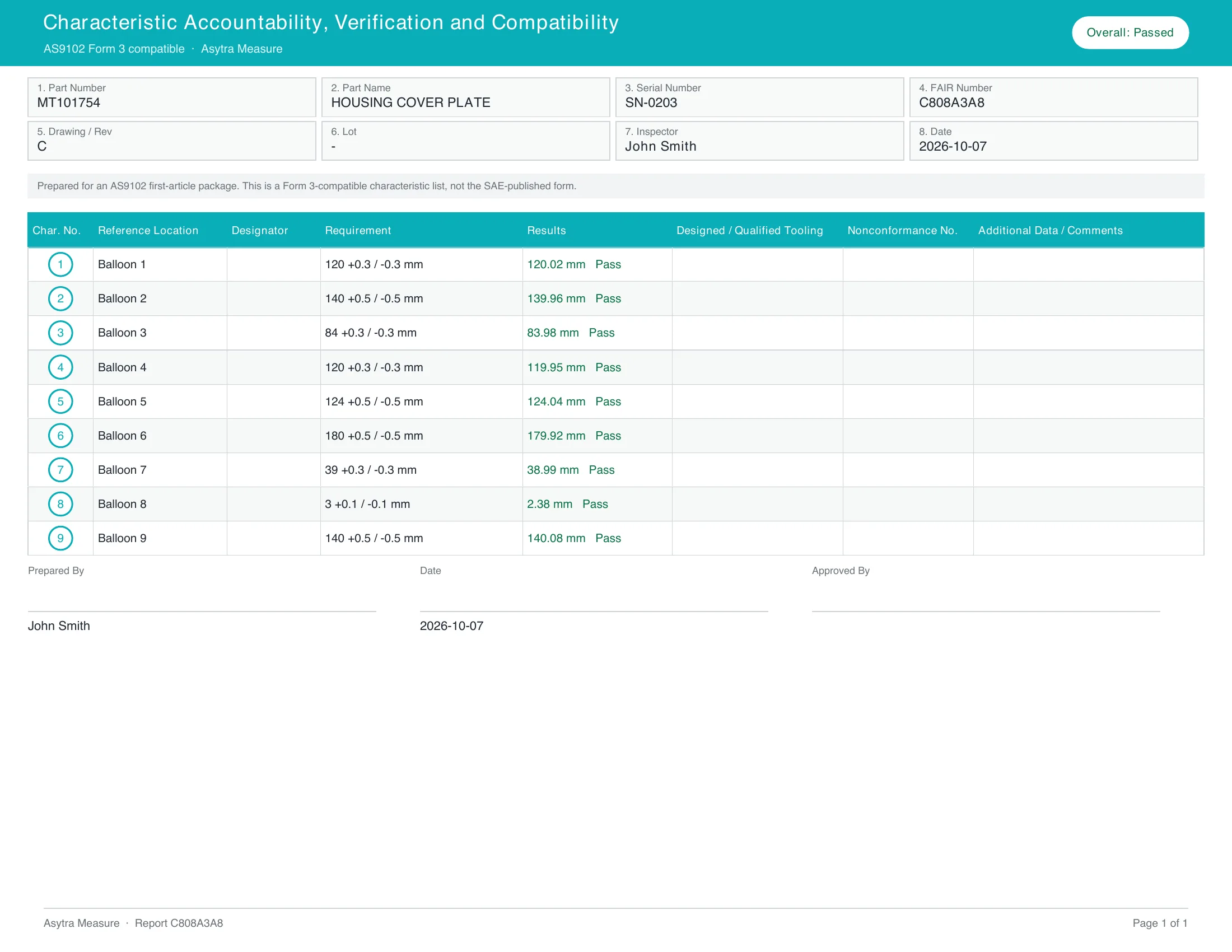
If your customer asks for a specific form rather than a general report, that is a different output. AS9102 forms for aerospace and PPAP forms for automotive are available on a paid plan. If you are unsure which standard applies, your customer will tell you, and they will tell you in the purchase order rather than at delivery.
When a spreadsheet is still the right answer
This is worth saying, because not every part needs a system. If you make the same part over and over, you have already solved it once and the spreadsheet you built is the answer. Copying last week's report and changing two numbers is faster than any tool.
A spreadsheet is a poor fit when the drawing is new, when the revision has changed more than a dimension or two, when several people need to work on the same part, or when the report has to prove something later to someone who was not there. That last case is the one that decides it. If the report is ever going to be read as evidence, it needs to be produced the same way every time, and that is what a tool is for.
Getting started
Measure is included with Trace Pro and every Quote plan, for every user on the plan. Companies without one of those plans can start free during early access with usage limits, or request access and we will turn it on for you. Exact limits and paid options are on the Measure pricing page.
Start with one real drawing rather than a test part. Pick something you have already inspected by hand so you know what the answer should be, then compare. The point of the first run is not speed. It is finding the differences between what the drawing says and what your shop decided, which is useful to know either way.
Related reading: measuring report templates and what they are for, and what a first article inspection involves.
Frequently asked questions
At minimum it needs the part and job identification, every characteristic being verified with its nominal value and tolerance, the measured result for each one, a pass or fail status, and a sign-off from the person who inspected and the person who approved it. A completed drawing or a ballooned drawing attached to the report makes it far easier to read later.
The time is dominated by retyping the drawing rather than by inspecting. Reading dimensions off a drawing and entering them one at a time is the slow part, and it is also where transcription errors creep in. If your drawing has twenty characteristics you should expect to spend most of your effort on data entry rather than measurement.
Yes. Vector drawings and scans can be read for dimensions and tolerances, which builds the characteristic list for you. Asytra Measure does this as part of creating a template from an uploaded drawing, so you review and correct the extracted values rather than typing them in from scratch.
AS9102 defines formal first article inspection requirements and forms for aerospace. PPAP is the automotive equivalent, covering parts approval and the evidence a supplier submits. Many customers ask for their own form layout rather than a general report. Asytra Measure produces a general first article report, with AS9102 and PPAP forms available on a paid plan.
Asytra Measure is included with Trace Pro and every Quote plan. If your company does not have one of those, you can start free during early access with usage limits, or request access and we will turn it on for your company. Exact limits and paid options are published on the Measure pricing page.